
Shutdown scheduling
Shutdown Scheduling: Critical Path, Gantt Chart and Float
A shutdown schedule links every activity to its predecessors, gives each a duration and resources, and calculates the critical path: the longest continuous sequence of activities, which sets the earliest finish. A delay on a critical activity delays the whole shutdown day for day. Float is how long other activities can slip.
Scheduling here means sequencing the stop itself. Planning before the stop is in the planning guide.
How MaintWiz helps: A Gantt chart helps only if the critical path stays current. The MaintWiz shutdown module puts the whole shutdown on a Gantt chart with the critical path, float and baselines, so you can see what moves the finish date. See the module · Get the Gantt template
By Jai Balachandran · Published · Last reviewed
What MaintWiz adds:Gantt with critical path and floatBaselines show what movedFloat flag at your limitOne plan from portfolio to task
Contents
What must a shutdown schedule contain?
A shutdown schedule contains every activity, linked by logic, with a duration, resources, calendars and a baseline. GAO's schedule guide sets these out as best practices for any project schedule, and they apply directly to a shutdown.1
For reporting outages as planned or forced, see nuclear refueling outage planning.
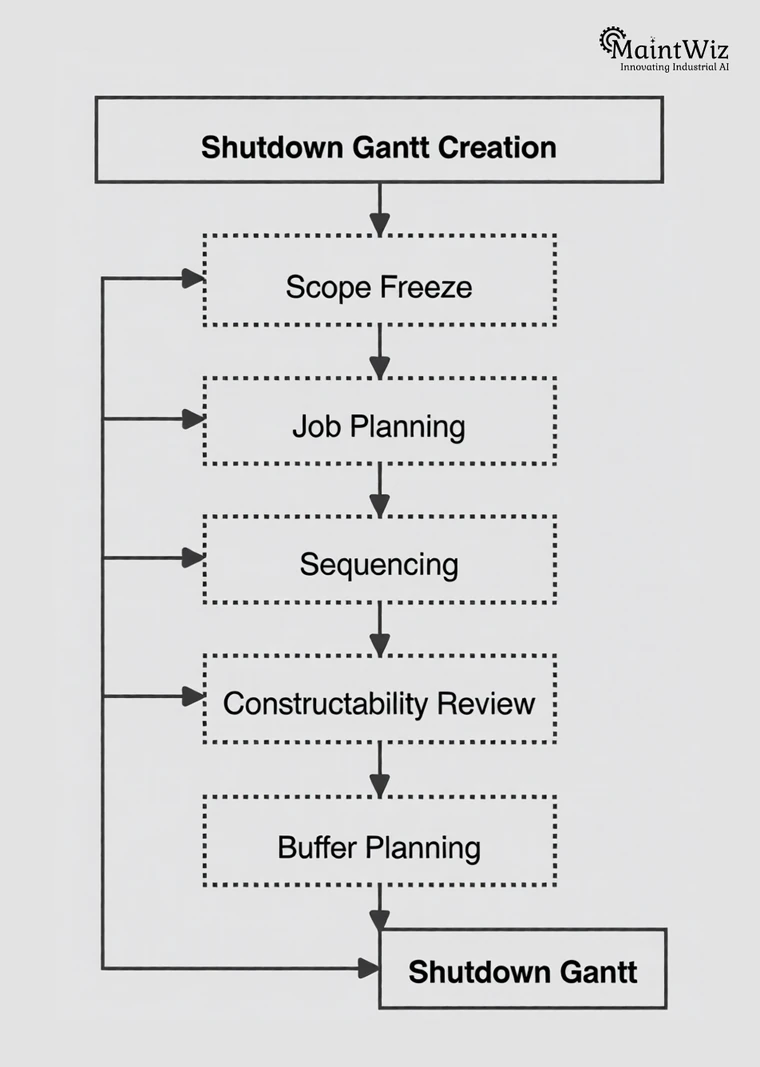
Scheduling here means sequencing the stop itself. Planning before the stop, including phases and gates, is in the planning guide; the work is shutdown maintenance.
| Element | What it means | Why it matters |
|---|---|---|
| Every activity | All the work from the work packages, plus isolation, permits, restart and close-out | Work missing from the schedule is invisible to the critical path |
| Logic | Each activity linked to what must finish before it starts. GAO describes an ideal chart as a continuous waterfall of activities logically linked with finish-to-start relationships | The critical path is calculated from the links, not drawn by hand |
| Durations | An estimate for each activity, owned by the person who does the work | Unreasonable durations hide float and move the end date |
| Resources | All required labor and significant materials, equipment and other costs assigned to activities, compared with what is available | GAO: a resource-loaded schedule shows whether the resources will be there when needed |
| Calendars and constraints | Working shifts and non-working periods; date constraints only where justified | GAO: non-working periods are not float; date constraints override the network logic |
| A baseline | The original plan that stakeholders agreed, kept so that progress can be compared with it | GAO defines the baseline as the consensus on sequence, resources and key dates |
Sources: GAO schedule guide, GAO cost guide.
Critical path
What is the critical path, and what is float?
The critical path is the longest continuous sequence of activities, and it sets the earliest finish. Float is the time an activity can slip without delaying the end date, and critical activities have none.
The shutdown turnaround glossary defines critical path, float and earned value terms with sources. On critical path vs critical chain, see the float example.
GAO defines the critical path as the longest continuous sequence of activities in a schedule, which defines the earliest completion date. It defines total float as the time an activity can slip before its delay affects the end date, and says that float should not be treated as schedule contingency because it is shared along a sequence of activities. 1
Early finish
EF = ES + duration
The forward pass adds durations through the network from day one to give each activity's early start and finish.
Float
Float = LS - ES
Late start minus early start, from the backward pass. It is the time an activity can slip before it delays the end date.
Critical
Float = 0
With no date constraints, critical activities have zero float, so any delay moves the finish day for day.
Float is shared
Float belongs to the sequence, not to one activity. If one activity uses it, the others on that path lose it. 1
Non-working time is not float
Shifts and non-working periods in the calendar are not flexibility. 1
Watch near-critical work
Activities with a small amount of float can become critical quickly. GAO says management must closely monitor critical and near-critical activities. 1
Software
Where should the shutdown schedule live?
A shutdown schedule should live where it can be updated by the people doing the work, and where scope, materials and permits sit in the same place. A spreadsheet can list activities and draw bars, but the critical path and float need the logic links between activities, so use a tool that calculates the network or check by hand as in the example.
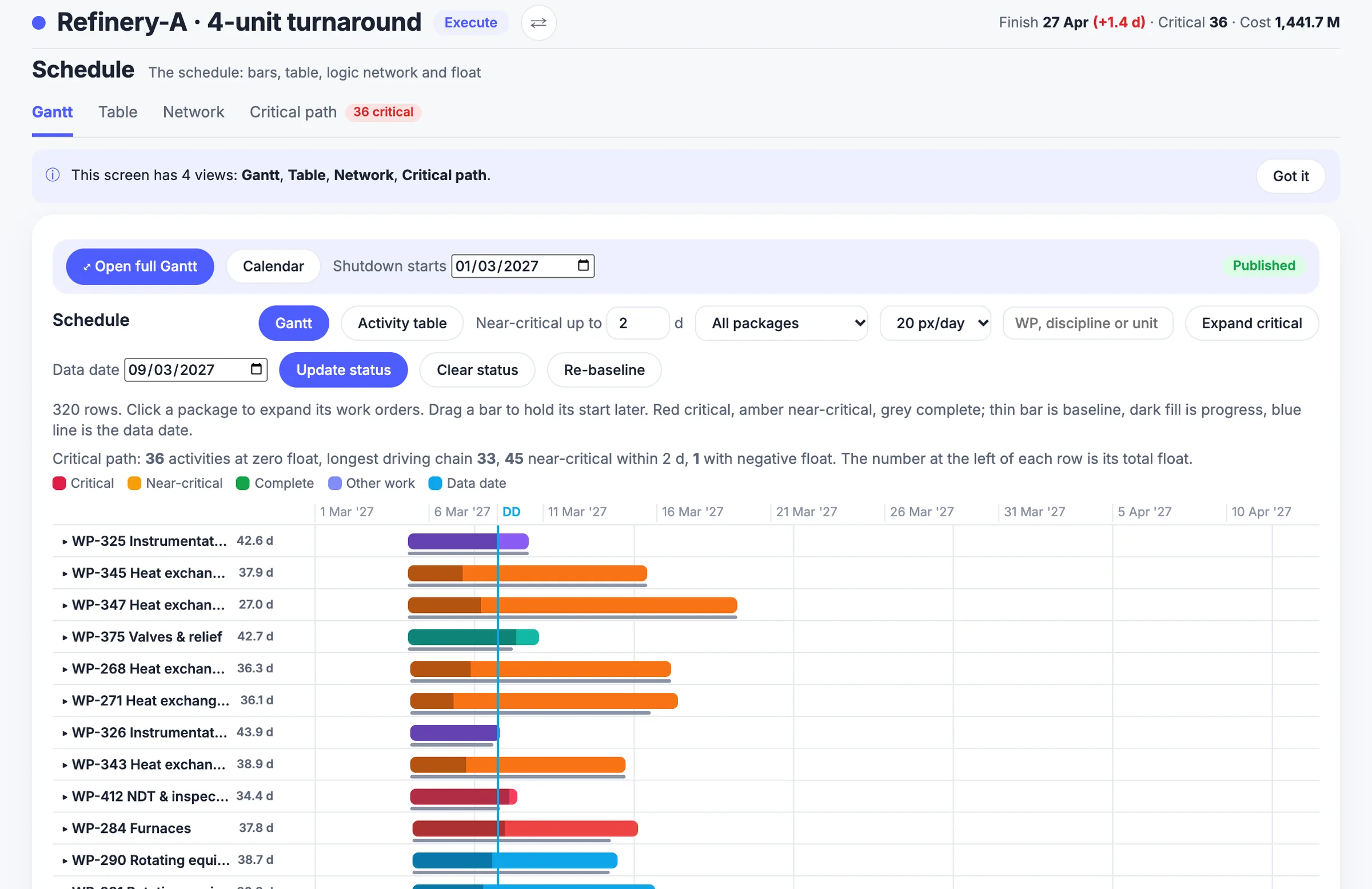
The shutdown management software page and the shutdown module data sheet describe the Gantt and float features. For scheduling tool choice see shutdown software vs CMMS vs Primavera P6.
A shutdown network can be built in scheduling software such as Oracle Primavera P6, which Oracle says uses the Critical Path Method algorithm, or Microsoft Project, where tasks on the critical path can be shown with red Gantt bars. 5,6
About MaintWiz. MaintWiz is an industrial AI platform with IoT, SAP integration and predictive maintenance (PdM) capabilities. Its shutdown and turnaround module helps plants plan, schedule, execute and close out shutdown work.
Also: product data sheet.
What the shutdown module covers
As described on the MaintWiz shutdown maintenance product page.
- Shutdown calendar and critical-path scheduling, with work order sequencing and dependencies
- Asset prioritization, so the most critical equipment is scoped first
- Resource planning for people, spares, heavy equipment such as cranes, and outsourced vendors
- Electronic permits to work, risk management and contingency plans
- Real-time progress monitoring: schedule adherence, cost variance, quality metrics and risk factors
- Step-by-step checklists, pre-restart testing protocols and post-shutdown analysis
Proof
What MaintWiz customers report
Figures as published in MaintWiz case studies on maintwiz.com. They come from maintenance management projects, not shutdowns.
Worked example
How do you find the critical path? A worked example
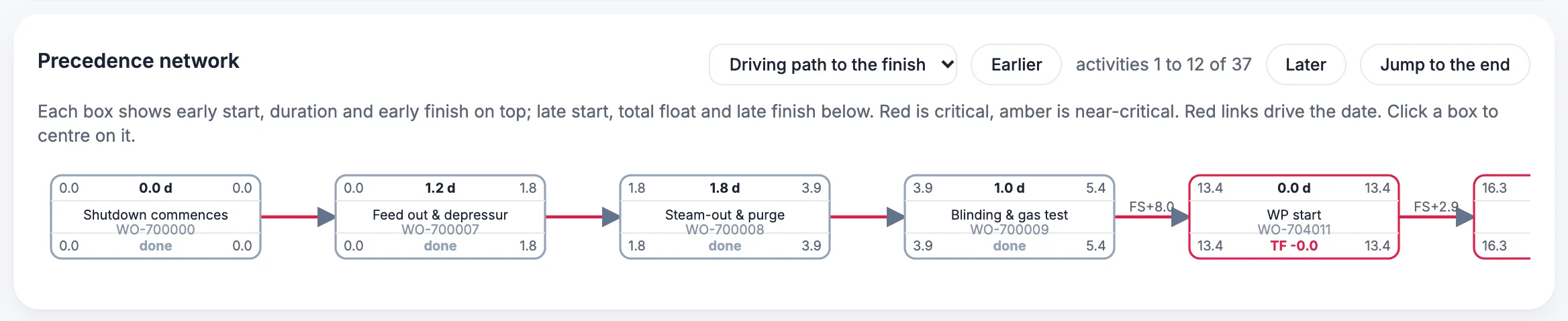
To find the critical path, add durations forward to get early dates, work backward from the finish to get late dates, and the activities with zero float form the critical path. In this made-up example the critical path is A, B, C, D, G, H and the job takes 10 days; the pump work (E, F) has 1 day of float.
To try this on your own task list, paste it into the free Excel to Gantt tool.
Durations are illustrative, not typical values. Dates are elapsed days from the start of the shutdown.
- Critical path. A, B, C, D, G and H have zero float. A delay to any of them moves the finish date by the same amount.
- Float. The dashed line is float: how far a job can slip without moving the finish. F can start up to 1 day late, or take up to 1 day longer.
- Dependency. Each arrow is a finish-to-start link. G cannot start until both D and F are finished.
- Finish date. The longest chain of dependent jobs, 10 days, sets the finish. Shortening a job that is not on it does not bring the finish forward.
- Shared float. E and F are in sequence, so they share the same 1 day. If E uses it, F has none left and both become critical.
| ID | Activity | Days | After | Early start | Early finish | Late start | Late finish | Float | Critical? |
|---|---|---|---|---|---|---|---|---|---|
| A | Isolate and drain the unit | 1 | - | 0 | 1 | 0 | 1 | 0 | Yes |
| B | Open and clean the heat exchanger | 2 | A | 1 | 3 | 1 | 3 | 0 | Yes |
| C | Inspect the exchanger | 1 | B | 3 | 4 | 3 | 4 | 0 | Yes |
| D | Replace the tube bundle | 3 | C | 4 | 7 | 4 | 7 | 0 | Yes |
| E | Overhaul the pump | 4 | A | 1 | 5 | 2 | 6 | 1 | No |
| F | Align and test the pump | 1 | E | 5 | 6 | 6 | 7 | 1 | No |
| G | Reassemble and leak test | 2 | D, F | 7 | 9 | 7 | 9 | 0 | Yes |
| H | Restart | 1 | G | 9 | 10 | 9 | 10 | 0 | Yes |
How to read it. The forward pass gives early dates: D finishes on day 7 and F on day 6, so G cannot start before day 7. The backward pass from day 10 gives late dates: G must start by day 7, so F must finish by day 7 and E by day 6. E can start on day 1 but may start as late as day 2, so it has 1 day of float. The chain A, B, C, D, G, H has none.
Try it: change a duration and watch the critical path move
Edit any duration (whole days). The logic links are fixed as in the worked example. The sums run in your browser; nothing is sent or stored.
| ID | Activity | After | Days | Early start | Early finish | Float |
|---|---|---|---|---|---|---|
| A | Isolate and drain the unit | none | ||||
| B | Open and clean the heat exchanger | A | ||||
| C | Inspect the exchanger | B | ||||
| D | Replace the tube bundle | C | ||||
| E | Overhaul the pump | A | ||||
| F | Align and test the pump | E | ||||
| G | Reassemble and leak test | D, F | ||||
| H | Restart | G |
Resources
Why does resource leveling move the end date?
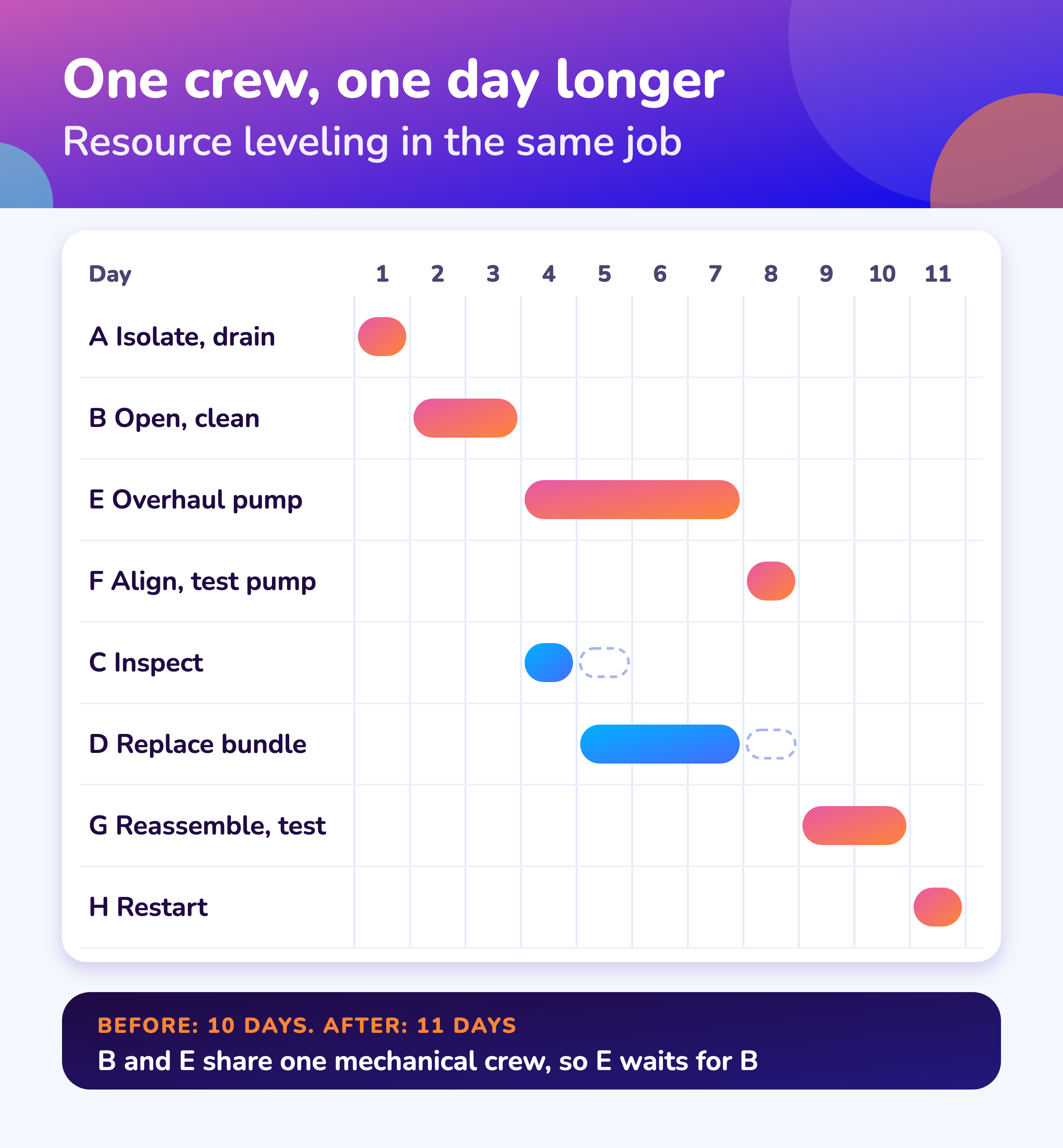
Resource leveling moves the end date because a schedule that ignores crews assumes they are free. When two activities need the same crew, one has to wait, and if the wait is longer than that activity's float, the end date moves. In the example, B and E need the same crew, so the job grows from 10 to 11 days.
A mill reline, where one crew sets the critical path, is shown in mining shutdown planning. Convert hours to headcount with the turnaround manpower plan and labor histogram.
GAO describes a resource-loaded schedule as one that assigns all required labor and significant materials, equipment and other costs to activities and compares them with what is available, so it shows whether resources will be there when needed. It also notes that knowing float lets management reassign resources from activities that can slip to those that cannot. 1
| ID | Activity | Early start | Early finish | Float | Critical? |
|---|---|---|---|---|---|
| A | Isolate and drain the unit | 0 | 1 | 0 | Yes |
| B | Open and clean the heat exchanger | 1 | 3 | 0 | Yes |
| E | Overhaul the pump (waits for the crew) | 3 | 7 | 0 | Yes |
| F | Align and test the pump | 7 | 8 | 0 | Yes |
| C | Inspect the exchanger | 3 | 4 | 1 | No |
| D | Replace the tube bundle | 4 | 7 | 1 | No |
| G | Reassemble and leak test | 8 | 10 | 0 | Yes |
| H | Restart | 10 | 11 | 0 | Yes |
Here E had 1 day of float but had to wait 2 days for B, so E and F became critical and the job grew by 1 day. Shutdown crews, cranes and the permit desk are the usual shared resources. HSE guidance lists competing demands between maintenance, contract work, operation and modifications among the pressures a realistic schedule must manage. 4
Control
How do you keep a shutdown schedule honest while it runs?
To keep a shutdown schedule honest while it runs, baseline it, update it on a fixed rhythm, recalculate the critical path each time, and treat new work as a change request.
Measure progress against the baseline with the shutdown S-curve and percent complete guide.
- 1
Baseline it
Freeze the agreed plan as the baseline. GAO describes a baseline as the consensus on sequence, resource assignments and acceptable dates. 1
- 2
Update progress on a fixed rhythm
Record actual progress at the same time each shift or day so the schedule reflects the plant, not last week.
- 3
Recalculate and look at the critical and near-critical paths
GAO's Gantt chart can show baseline dates, forecast dates and actual progress for each activity. 1
- 4
Treat discovered work as a change
NERC's generator rules treat discovery work as outside the original scope: in-scope inspection overrun is a planned extension, repairs to damage found are forced outage time. 3
- 5
Recover with a plan, not with float
Float is shared and not contingency. Re-sequence, add shifts or resources on critical activities, and record why.
More: daily shutdown management · why schedules slip · critical chain · execution.
Errors
What are the common shutdown scheduling errors?
The common shutdown scheduling errors are constraints that override logic, float used as contingency, ignored calendars and resources, and no baseline.
Date constraints that override logic
A constraint on a start or finish date overrides network logic. GAO says constraints that cause negative float should be examined and justified. 1,2
Float treated as contingency
Float is shared, so it is not a reserve for any one activity. 1
Calendars ignored
A job planned on 24-hour days that crews work in shifts will finish late. Non-working periods are not float. 1
No baseline
Without a baseline you can say where you are, but not how far you have moved. Keep the original plan.
Visuals
Save the scheduling charts
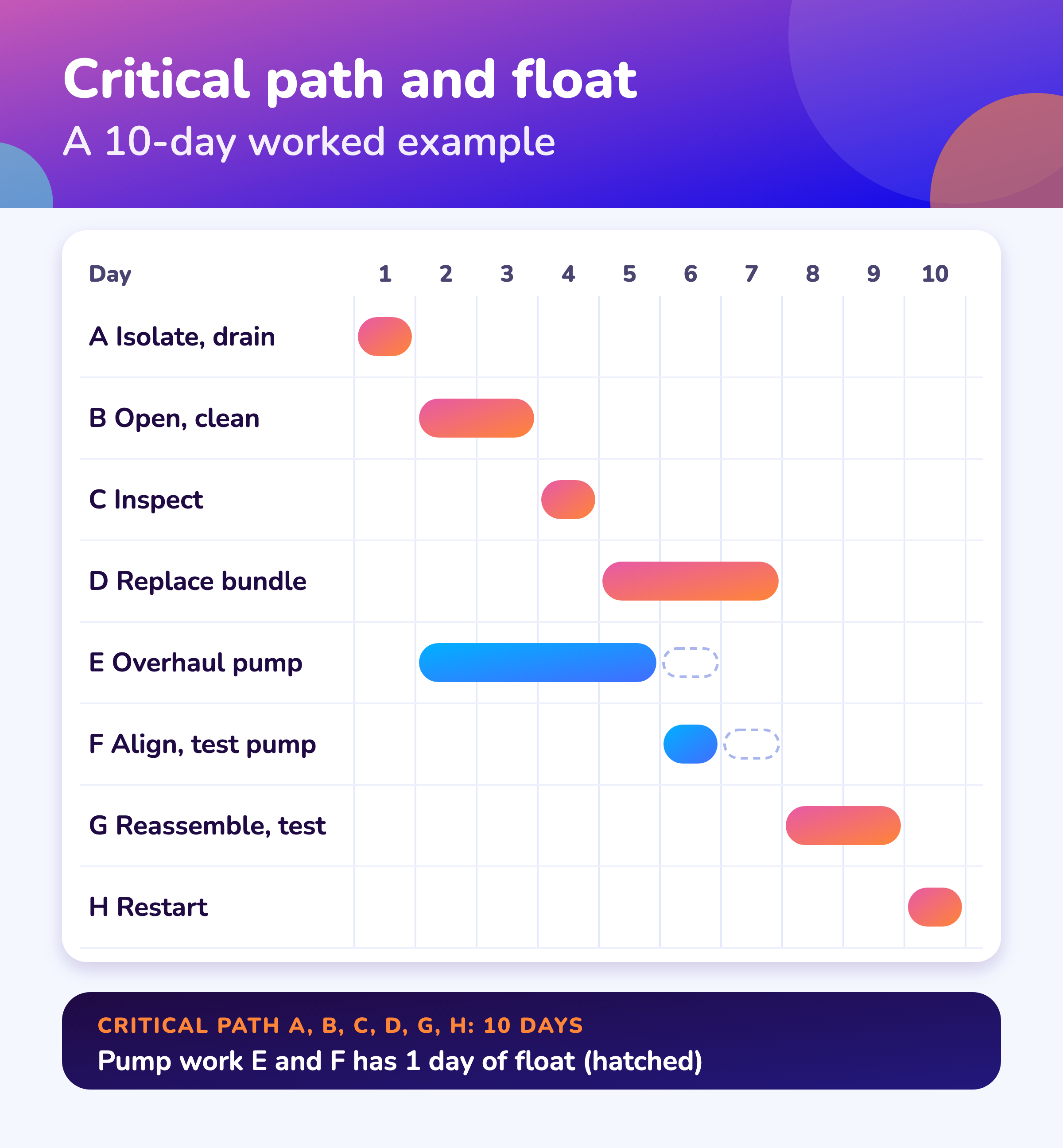
Two scheduling charts to save or share; click for the full-size version.
FAQ
Frequently asked questions
What is the critical path in a shutdown schedule?
It is the longest continuous sequence of activities in the schedule. It defines the earliest completion date, so a delay to any activity on it delays the whole shutdown by the same amount. 1
What is float in a shutdown schedule?
Float is the time an activity can slip before it delays the end date. With no date constraints, critical activities have zero float. 1
Is float the same as contingency?
No. GAO says float should not be treated as schedule contingency, because it is shared along a sequence of activities and any activity on the sequence can use it up. 1
What should a shutdown Gantt chart show?
Every activity as a bar, in logical order, with the critical path marked, resource assignments available, and baseline, forecast and actual dates compared. GAO says a Gantt chart can show baseline dates, forecast dates and actual progress for each activity. 1
Can I schedule a shutdown in Excel?
A spreadsheet can list activities and draw bars. The critical path and float depend on the logic links between activities, so you need a tool that calculates the network, or you must calculate it by hand as in the worked example.
Should the schedule be hour by hour or shift by shift?
Choose a time unit small enough to show your shortest critical activities, and match it to how often you update. This is scheduling guidance, not a sourced benchmark.
What is resource leveling?
It is adjusting the schedule so that activities do not need more of a resource than is available. In the worked example leveling for one shared crew moves the end date from day 10 to day 11. GAO describes resource-loaded schedules as a way to see whether resources will be available when needed. 1
How often should the schedule be updated during a shutdown?
On a fixed rhythm, at least each shift or day, then recalculate the critical and near-critical paths. GAO says management must closely monitor critical and near-critical activities. 1
Sources
Sources
- US Government Accountability Office, GAO Schedule Assessment Guide: Best Practices for Project Schedules (GAO-16-89G, December 2015)
- US Government Accountability Office, GAO Cost Estimating and Assessment Guide (GAO-20-195G, March 2020)
- North American Electric Reliability Corporation, Generating Availability Data System (GADS) Data Reporting Instructions, effective 1 January 2026
- UK Health and Safety Executive, The safe isolation of plant and equipment (HSG253, 2006)
- Oracle, Primavera P6 (product page)
- Microsoft Support, Show the critical path of your project in Project
Put your shutdown schedule in one plan
Book a demo and bring your shutdown schedule. We will show how the module handles the critical path, float and baselines.