
Compare
Microsoft Project Alternatives for Turnarounds: From Gantt Chart to Controlled Stop
MaintWiz is a turnaround alternative to Microsoft Project that puts planning, readiness gates, permits, spares, field execution and cost in one plan. It adds AI agents, Monte Carlo confidence of finish and what-if scenarios, with SAP integration in PM or MM mode. Plants can import their current plan and compare the critical path before they switch.
STO means shutdown, turnaround and outage. Statements about Microsoft Project are based on publicly available material.
How MaintWiz helps: Plants compare tools on the whole stop, not only on the schedule. The MaintWiz shutdown module moves the plan from spreadsheets into one system with a critical path, readiness gates, permits and spares status. See the module · Get the Gantt template
By Jai Balachandran · Published · Last reviewed
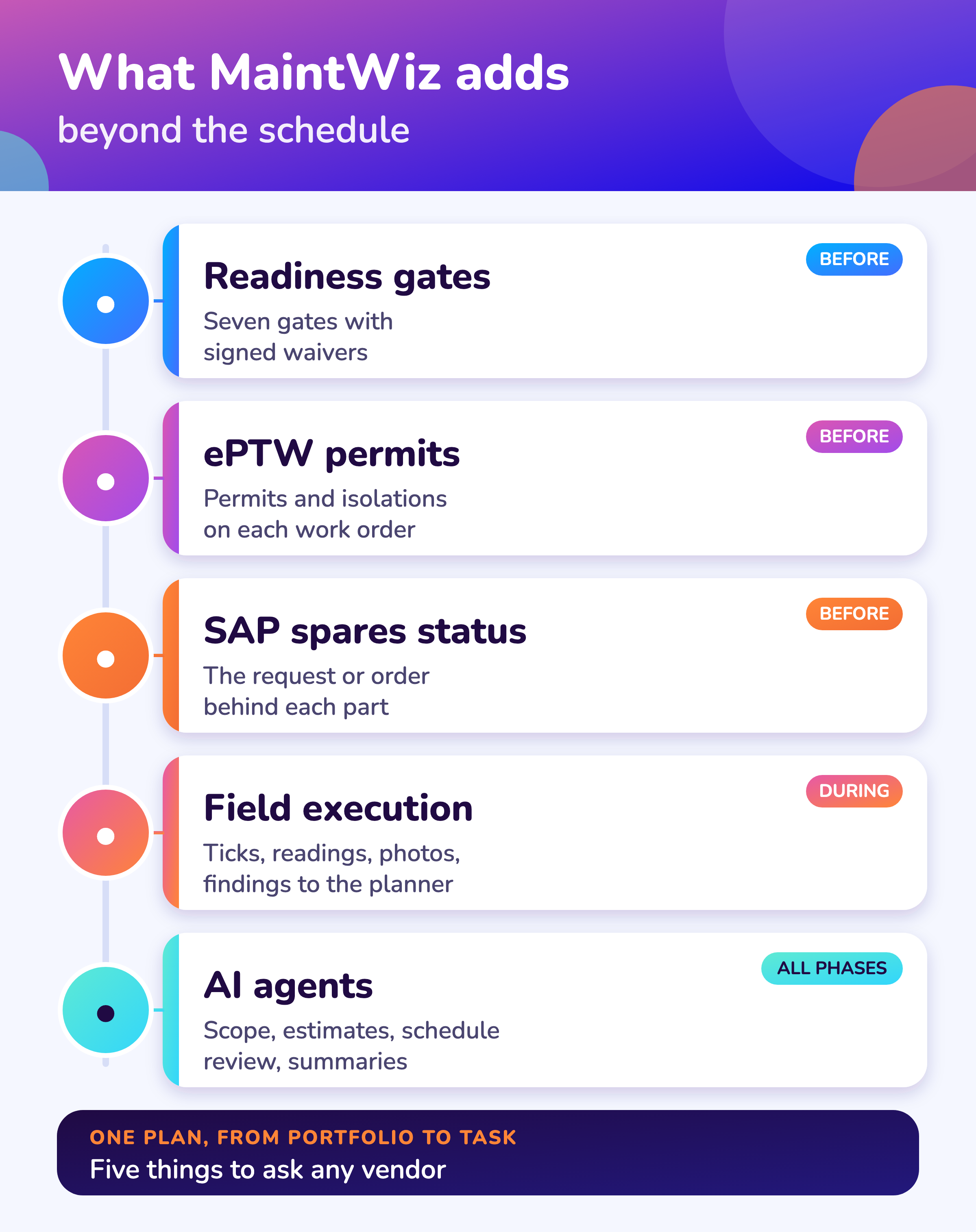
What MaintWiz adds:Critical path and floatReadiness gatesPermits and isolationsSpares status with SAP
Overview
Why look for a Microsoft Project alternative?
Plants look for a Microsoft Project alternative when they want the schedule, the readiness checks, the permits, the spares and the field work in one system, and MaintWiz delivers that as one turnaround module with AI agents on top. In this guide STO means shutdown, turnaround and outage.
Microsoft describes Project as a scheduling tool with Gantt charts, dependencies, a calculated critical path and resource leveling.
A Gantt chart in Microsoft Project shows the plan. A turnaround needs the plan, the permits, the parts and the people in the field in one place. MaintWiz gives you the same Gantt and critical path, plus the resource-aware view and the controls that keep the stop on it.
Comparison
How does MaintWiz compare with Microsoft Project?
MaintWiz covers planning, readiness, permits, spares, field execution, cost and close-out in one plan, with AI agents, Monte Carlo and what-if analysis, where Microsoft Project is described in its public material as a narrower or multi-module offer.
| Area | Microsoft Project (public descriptions) | MaintWiz |
|---|---|---|
| Built around | Scheduling with dependencies and resource leveling | The whole turnaround from portfolio to the task a technician ticks |
| Critical path | Calculated from task dependencies | Critical path and float, plus critical chain analysis that respects resources |
| What-if | Manual scenario copies | What-if scenarios on the live plan |
| Many users in the field | Plan file or online plan for planners | Role-based screens for planners, supervisors, technicians and executives |
| Readiness | Not part of scheduling | Seven readiness gates with signed waivers |
| Permits and isolations | Outside the tool | ePTW on each work order; package cannot close with one open |
| Spares | Outside the tool | Needed, in stock and short, with the SAP request or order behind each part |
| Cost and risk | Cost fields and reports | Earned value, cost and schedule indices, budget, actual and forecast, and Monte Carlo confidence of finish |
| AI | Not part of its public description | AI agents for scope, estimates, schedule review, daily summaries and lessons |
Statements about Microsoft Project reflect its publicly available material as of October 2026 and may change.
MaintWiz
What does the MaintWiz turnaround module include?
The MaintWiz shutdown and turnaround module plans, prepares, executes, controls and closes the stop in one system, with SAP integration and AI agents for the planning tasks.
Bring your plan to a demo and we will load it next to your current tool, so you can compare the critical path, the gates and the daily view on your own data.
About MaintWiz. MaintWiz is an industrial AI platform with IoT, SAP integration and predictive maintenance (PdM) capabilities. Its shutdown and turnaround module helps plants plan, schedule, execute and close out shutdown work.
What the shutdown module covers
As described on the MaintWiz shutdown maintenance product page.
- Gantt chart with critical path, float, baselines and a float flag
- Critical chain analysis and what-if scenarios on the live plan
- Monte Carlo confidence of finish and the drivers of the forecast finish
- Seven readiness gates with signed waivers
- Permits and isolations from ePTW on each work order
- Spares status with the SAP request or order behind each part
- Technician checklists with readings, photos and findings to the planner
- AI agents for scope, estimates, schedule review, daily summaries and lessons
Proof
What MaintWiz customers report
Figures as published in MaintWiz case studies on maintwiz.com. They come from maintenance management projects, not shutdowns.
Advantages
Where does MaintWiz go further than Microsoft Project?
MaintWiz goes further in four places: readiness and permits that stop unready jobs, field execution that updates the plan, spares status tied to SAP, and AI agents that do the first pass for the planner.
A critical path that sees the crew
Critical chain analysis takes resource limits into account, so a plan with a free path but no crew is flagged.
The field updates the plan
Technicians tick tasks and enter readings. No one re-keys progress into a plan file.
Gates and permits
Jobs start when permit, parts, crew and access are ready.
Executive view
See which stop is at risk and the decisions ranked by effect in days and money.
Lifecycle
How does MaintWiz cover the whole turnaround lifecycle?
MaintWiz covers the five phases of a turnaround in one system: planning with critical path, critical chain and Monte Carlo, preparation with readiness gates, permits and spares, execution by technicians, cost control with earned value, and close-out with lessons.
| Phase | What MaintWiz does |
|---|---|
| Plan | Gantt with critical path, float and baselines; critical chain analysis; what-if scenarios; Monte Carlo confidence of finish |
| Prepare | Seven readiness gates with signed waivers; ePTW permits and isolations; spares status with the SAP request or order; trade and tool availability across up to 20 projects |
| Execute | Today page; work orders with checklists, readings and photos; QR scan; offline on transaction screens; findings to the planner |
| Control | Earned value, cost and schedule indices; budget, actual and forecast cost; risk register ranked by days at stake; drivers of the forecast finish |
| Close | Handover notes, lessons learnt, deferred items and an archive of past stops |
See the turnaround software checklist for the questions to ask any vendor.
AI agents
What do MaintWiz AI agents do for a turnaround?
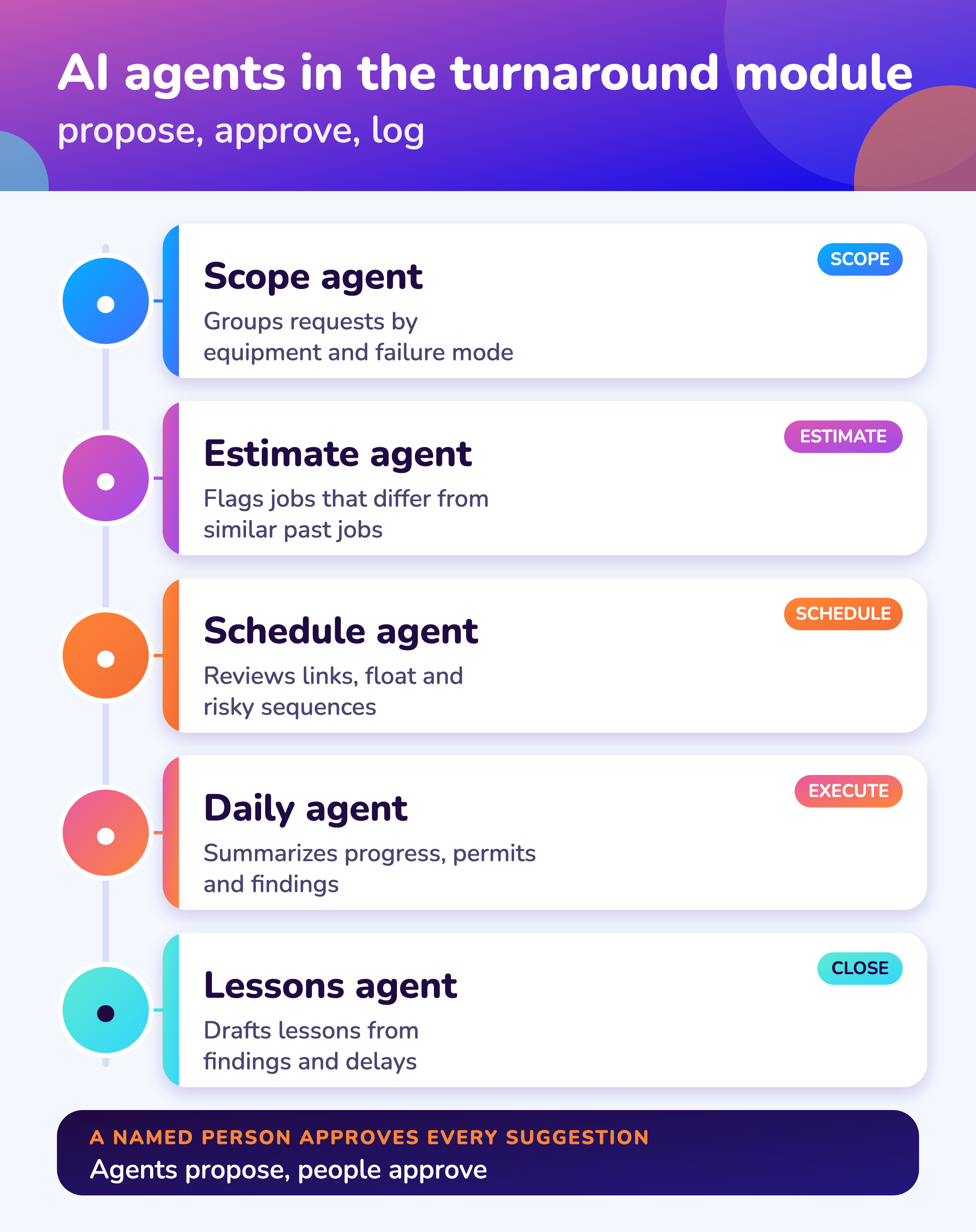
MaintWiz AI agents take the record-heavy first pass in a turnaround: they group scope, check estimates, review the schedule, summarize the day and draft lessons, and a named person approves every suggestion, which is logged.
| Agent | What it does | Who approves |
|---|---|---|
| Scope | Reads work requests and past findings, groups them by equipment and failure mode, and proposes what belongs in scope | The planner |
| Estimate | Compares each job with similar past jobs and flags estimates that look high or low | The planner and estimator |
| Schedule | Reviews the network for missing links, long float and risky sequences and shows what moves the finish date | The scheduler who owns the baseline |
| Daily | Summarizes progress, open permits, findings and look-ahead issues for the daily meeting | The turnaround manager |
| Lessons | Drafts lessons from findings, delays and deferred items | The turnaround manager |
Agents stay away from permits and isolations. For how to test an AI claim from any vendor, see AI shutdown planning.
Switching
How do you move from Microsoft Project to MaintWiz?
Move in four steps: import your task list, check the critical path against your current plan, run one pilot stop in parallel, then switch the stop to MaintWiz and keep Microsoft Project wherever else you use it.
- 1
Import
Bring the task list from your current tool or from Excel.
Day 1 - 2
Compare
Check the critical path and float against your current plan.
Week 1 - 3
Run in parallel
Run a pilot stop in both and compare status daily.
Pilot - 4
Switch
Move the stop to MaintWiz and train planners, supervisors and technicians.
Go
Import your Microsoft Project plan or an Excel task list and compare the critical path before you switch.
Visuals
Save the Microsoft Project comparison visuals
Two visuals for your selection team. Click either for the full-size image.
FAQ
Frequently asked questions
Can MaintWiz replace Microsoft Project for turnarounds?
Yes. It has a Gantt with critical path, float and baselines and adds readiness, permits, spares and field execution.
Can I import my Microsoft Project plan?
Yes. Import it or an Excel task list and check the critical path against your current plan.
Is a critical chain different from the critical path?
The critical path follows task dependencies. Critical chain analysis also takes resource limits into account. MaintWiz offers both on the live plan.
Does MaintWiz have AI agents?
Yes. AI agents handle scope grouping, estimate checks, schedule review, daily summaries and lessons, and a named person approves each suggestion. See AI shutdown planning.
Does MaintWiz have Monte Carlo and what-if analysis?
Yes. It gives a Monte Carlo confidence of finish, what-if scenarios and critical chain analysis on the live plan.
Does MaintWiz work with SAP?
Yes. It connects in SAP PM or SAP MM mode, shows the request or order behind each short part and keeps SAP as the system of record.
How long does it take to start?
Load your task list from Excel and run a pilot stop. See starting lean for a 90-day plan.
What does it cost?
Book a demo and ask for a written quote for your users, sites and modules. See turnaround software cost.
Sources
Sources
Statements about Microsoft Project are based on publicly available material as of October 2026 and may change. MaintWiz statements describe the shutdown and turnaround module. The GAO schedule guide is the reference for schedule practice.
Move your shutdown plan out of spreadsheets
Book a demo and bring the spreadsheet you use today. We will show how the module covers the same ground.