
Progress tracking
Shutdown S-Curve and Percent Complete: Measuring Progress
Shutdown progress is measured by crediting finished work with one agreed percent complete rule per task and plotting it against the planned S-curve every day. The schedule index (earned hours divided by planned hours) shows how far behind you are, and a three-day look-ahead keeps the next jobs ready. MaintWiz records daily progress against the baseline in the shutdown module.
STO means shutdown, turnaround and outage. The method is standard earned-value practice applied to shutdown work.
How MaintWiz helps: Progress is only useful when everyone measures it the same way. The MaintWiz shutdown module gives technicians checklists with readings and photos, sends findings to the planner and shows a Today view of what needs attention. See the module · Get the progress tracker
By Jai Balachandran · Published · Last reviewed
What MaintWiz adds:Today page for the plannerChecklists with readings and photosFindings to the plannerHandover notes and as-left summary
Definition
What is shutdown progress measurement?
Shutdown progress measurement credits finished work against the plan every day, using one agreed percent complete rule per task, and compares it with the planned S-curve so you can see whether you are ahead or behind while there is still time to act. 2
Progress is only useful if it is measured the same way every day by everyone. Without an agreed rule, one supervisor reports a job 80% done when the pipe is cut and another reports 80% when it is welded and tested. The overall number then swings with who reported it. This guide covers the rules, the S-curve, the schedule index and the three-day look-ahead that keeps the next jobs ready. STO means shutdown, turnaround and outage.
Download the free look-ahead and percent complete tracker (Excel) to credit progress and check readiness.
Rules
Which percent complete method should you use?
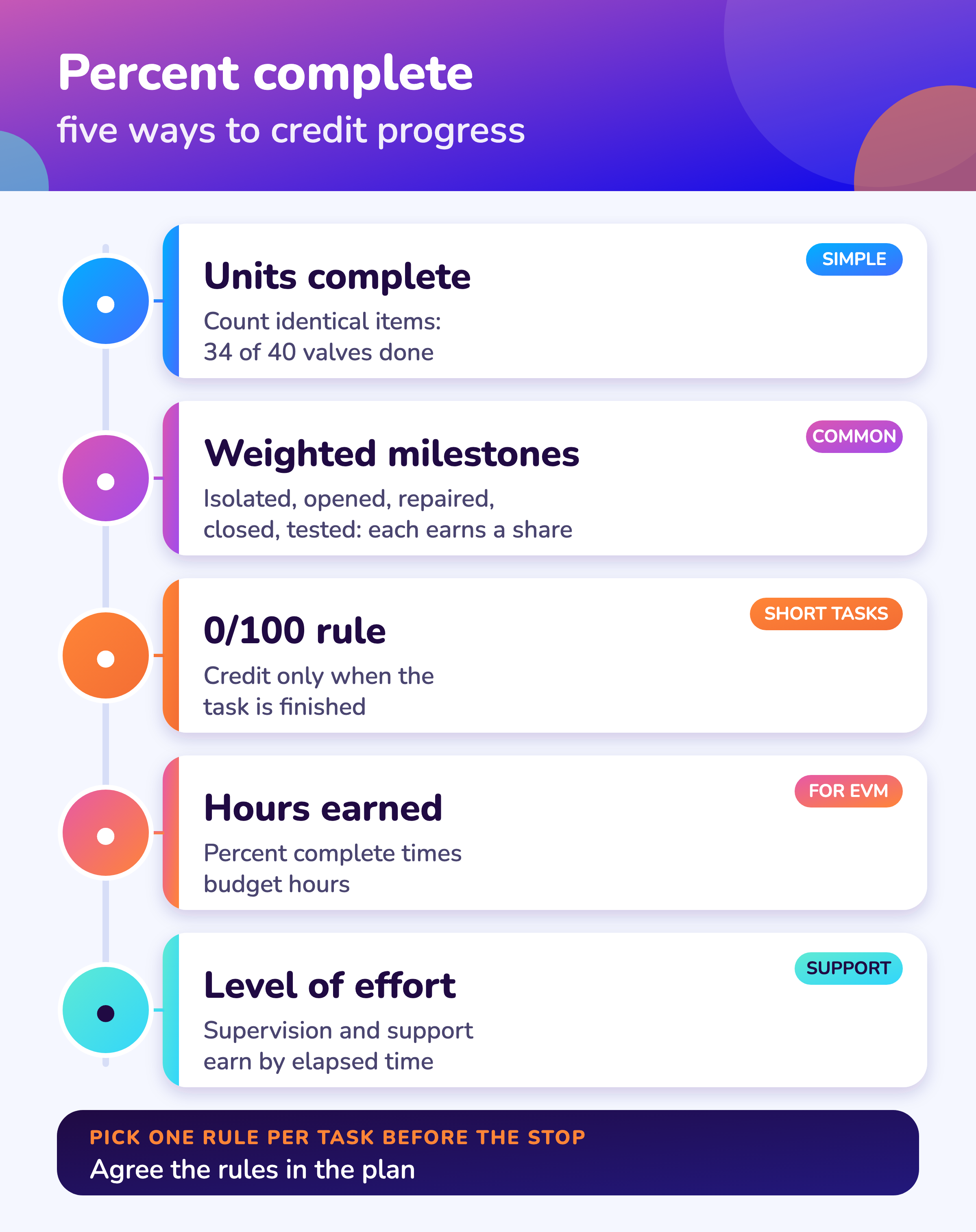
Use units complete for many identical items, weighted milestones for multi-step jobs, the 0/100 rule for short tasks and level of effort only for support work, and write the rule next to each task before the stop starts.
| Method | How it works | Best for | Watch out for |
|---|---|---|---|
| Units complete | Count finished items against the total | Many identical items such as valves, flanges, bolts | Items that differ a lot in effort |
| Weighted milestones | Each step earns a set share when done: isolated, opened, repaired, closed, tested | Multi-step jobs such as an exchanger or vessel | Weights set after the fact. Fix them in the plan |
| 0/100 rule | No credit until the task is finished | Short tasks of a shift or less | Long tasks look stalled until the end |
| 50/50 rule | Half credit on start, rest on finish | Medium tasks of one to three days | Starts without progress earn half |
| Hours earned | Percent complete times budget hours | Earned value and cost reporting | Needs honest budget hours |
| Level of effort | Credit follows elapsed time | Supervision, safety watch, site services | Hides slippage on real work, so keep it small |
Milestone weights are a planning choice. Agree them with the supervisors who do the work and keep them for the whole stop.
MaintWiz
How does MaintWiz track shutdown progress?
MaintWiz records daily progress against the baseline, calculates earned value with cost and schedule indices, and shows technician findings and readiness gates next to the plan; AI agents support shutdown planning.
Bring your last daily report to a demo and we will show the same day in the shutdown module. Tell us which reports you want automated: plant requirements shape what we build next.
About MaintWiz. MaintWiz is an industrial AI platform with IoT, SAP integration and predictive maintenance (PdM) capabilities. Its shutdown and turnaround module helps plants plan, schedule, execute and close out shutdown work.
What the shutdown module covers
As described on the MaintWiz shutdown maintenance product page.
- Gantt chart with critical path, float and baselines
- Earned value, cost and schedule indices
- Daily progress by package
- Checklists with readings and photos for technicians
- Findings from technicians sent straight to the planner
- Seven readiness gates with signed waivers
- Today view of what needs attention
Proof
What MaintWiz customers report
Figures as published in MaintWiz case studies on maintwiz.com. They come from maintenance management projects, not shutdowns.
S-curve
How do you build and read a shutdown S-curve?
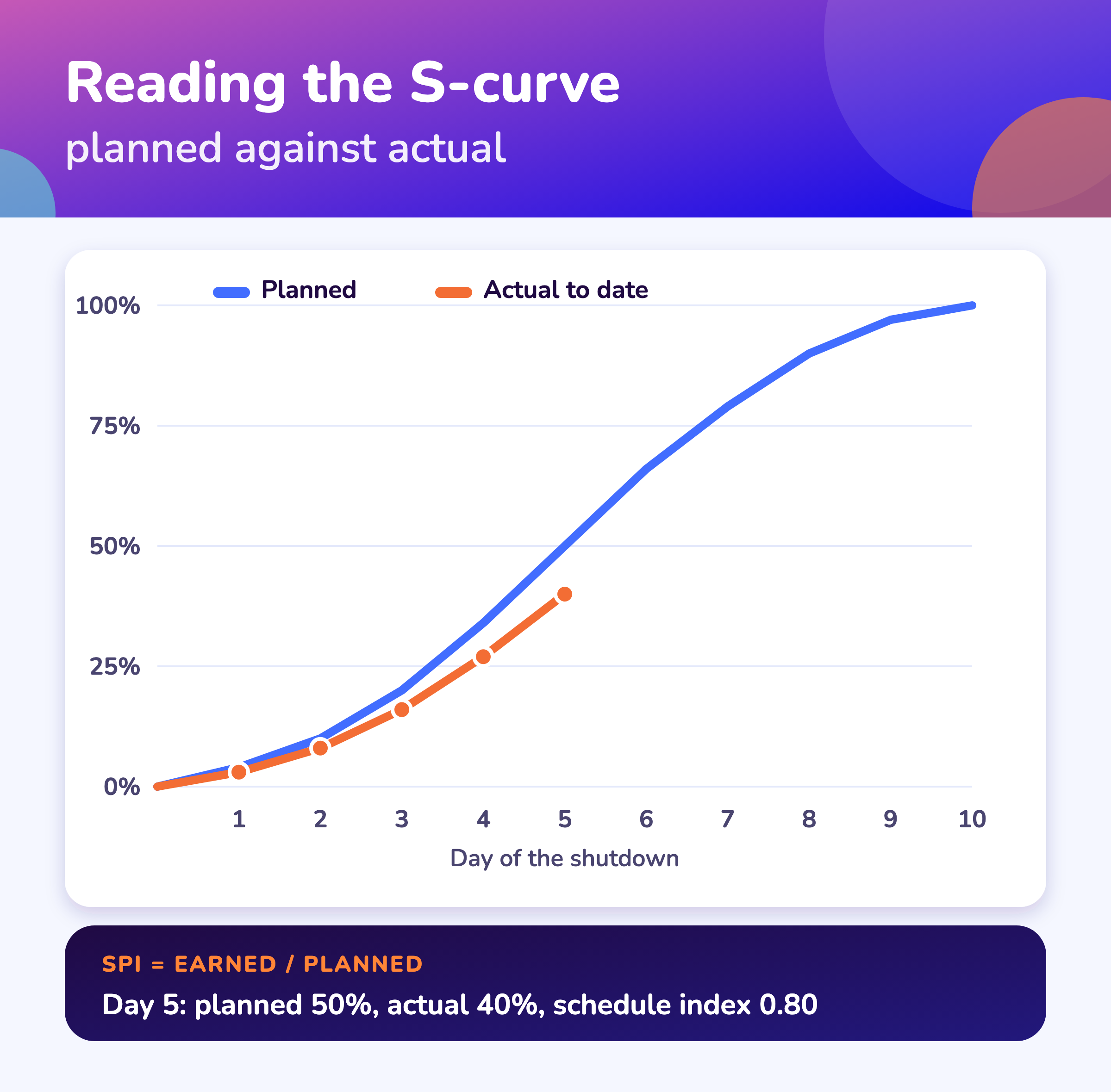
Build the S-curve by adding up planned hours day by day to get the cumulative planned line, adding earned hours each day to draw the actual line, and reading the gap and the schedule index: if 1,200 hours were planned by day 6 and the work done earns 1,020, the index is 0.85. 1,2
Earned hours
Budget hours × percent complete
The budget value of the work actually done.
Schedule index (SPI)
Earned hours ÷ planned hours to date
Below 1.0 means behind plan. Above 1.0 means ahead.
Overall percent complete
Total earned hours ÷ total budget hours
A weighted figure, not an average of task percentages.
- 1
Spread the baseline
Put each task's budget hours across its planned days.
Planned curve - 2
Fix the rules
One percent complete rule per task.
Before the stop - 3
Update daily
Supervisors report percent complete at a set time.
Same time daily - 4
Plot earned hours
Add earned hours to the actual line.
Actual curve - 5
Read the gap and index
Compare to plan; check the critical path.
Decide - 6
Recover or re-baseline
Add shifts, change sequence or agree a new baseline with the owner.
Act
| What you see | Likely meaning | First check |
|---|---|---|
| Actual below plan from day one | Late mobilization or jobs not ready | Look-ahead readiness and labor on site |
| Actual flat for days | A blocked group of jobs or credit held back by the 0/100 rule | Open permits, missing parts, rule used |
| Actual above plan, then flattens | Easy work done first, hard work left | Critical path jobs remaining |
| Actual on plan but end date slipping | Progress is on non-critical jobs | Float on the critical path; see shutdown scheduling |
An S-curve shows hours, not the critical path. A stop can be on the curve and still late if the late jobs are on the critical path.
Look-ahead
What is a 3-day look-ahead for a shutdown?
A three-day look-ahead lists every job starting in the next three days and checks each for permit, parts, labor, access, tools and procedure, so a job that is not ready is fixed or swapped before the crew is idle.
| Check | Question |
|---|---|
| Permit and isolation | Is the permit ready and the isolation proved? See permit management |
| Parts | Are parts on site, not just ordered? See spares planning |
| Labor | Is a named crew assigned, with the right skills? |
| Access | Is the scaffold or access ready? See scaffolding planning |
| Tools and lifts | Are cranes, tools and test equipment booked? |
| Procedure and drawings | Are the procedure, drawings and inspection plan issued? |
Hold it at the daily meeting, name an owner for each red item and review the open items again at the next meeting. Jobs that fail the check go to the top of the problem list, not to the bottom of the plan.
Daily report
What goes in a daily shutdown progress report?
A daily progress report shows the S-curve with the schedule index, the critical path status, the jobs not ready for the next three days, open permits and incidents, new findings and decisions needed, and cost against budget. 1
| Item | What to show | Why |
|---|---|---|
| S-curve | Planned and actual cumulative percent, with the schedule index | One picture of ahead or behind |
| Critical path | Jobs on it, their status and float | The finish date depends on these |
| Next 3 days | Jobs not ready and the owner | Prevents idle crews |
| Safety and permits | Open permits, incidents and near misses | See safety incidents |
| Findings and added scope | New work found and decisions needed | Scope growth is the main cause of slip |
| Cost | Spend against budget and forecast | See budget planning |
See daily shutdown management and schedule delays for what to do when the index drops.
Visuals
Save the progress measurement charts
Two visuals for your daily meeting. Click either for the full-size image.
FAQ
Frequently asked questions
What is an S-curve in a shutdown?
A chart of cumulative planned progress against cumulative actual progress by day. The shape is an S because work ramps up, peaks and tails off.
How do you calculate percent complete for a shutdown task?
Pick a rule before the stop: units complete, weighted milestones, 0/100, 50/50, hours earned or level of effort. Then credit progress by that rule every day.
What is the 0/100 rule?
No credit until the task is finished. It suits short tasks of a shift or less.
What is a schedule performance index?
Earned hours divided by planned hours to date. Below 1.0 is behind plan. 2
What is a 3-day look-ahead?
A list of jobs starting in the next three days, each checked for permit, parts, labor, access, tools and procedure.
How often should shutdown progress be updated?
Daily at a fixed time, and more often for critical path jobs during a short stop.
Why is the plant on the S-curve but still late?
The curve measures hours. If the late jobs are on the critical path, the finish date slips even when overall progress matches the plan.
Can we track shutdown progress in Excel?
Yes for a small stop. The look-ahead and percent complete tracker (Excel) credits progress and checks the look-ahead. Beyond a few hundred tasks, a shutdown module keeps progress tied to the schedule.
Does MaintWiz track shutdown progress?
Yes. It records daily progress against the baseline and shows earned value with cost and schedule indices. AI agents are part of the module. See AI shutdown planning.
Sources
Sources
The method follows standard earned-value and schedule practice. The GAO schedule guide and the HHS earned value glossary are the references used.
Run the shutdown from one live plan
Book a demo and bring a typical shift. We will show tasks, readings, photos and findings in the module.