
SAP PM
SAP PM Shutdown Management: Revisions, Orders and Critical Path
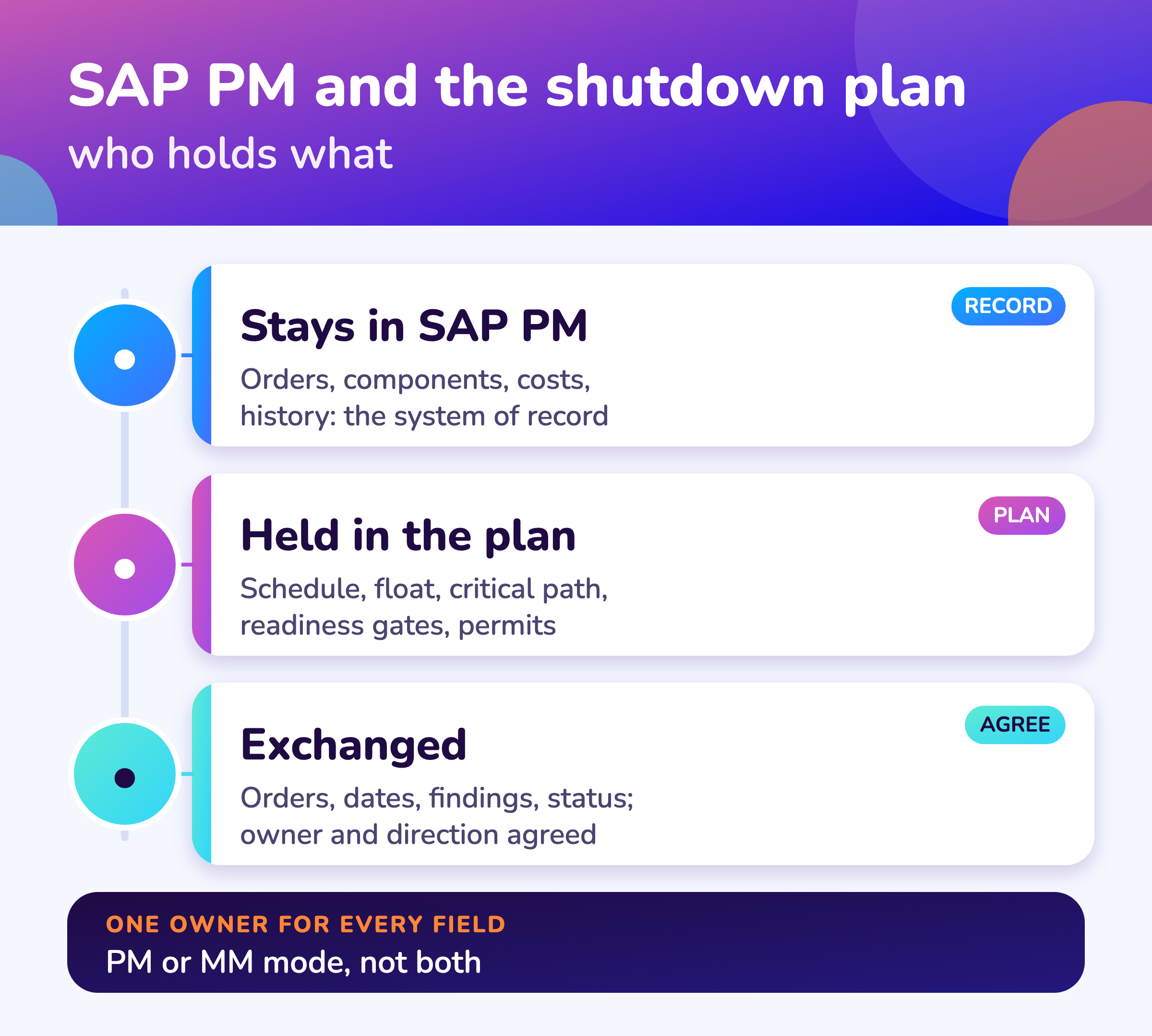
SAP PM can hold the orders, components, revision and history of a shutdown, and a shutdown plan adds the logic-linked schedule with critical path and float, readiness gates, permits and an executive view on top. MaintWiz connects through SAP PM or SAP MM, not both, and SAP stays the system of record.
SAP statements come from SAP Library and SAP Help pages read for the releases cited. MaintWiz statements describe the shutdown module as built.
How MaintWiz helps: SAP PM holds the orders; the shutdown plan adds the critical path. The MaintWiz shutdown module connects to SAP through the PM or the MM module, with SAP staying the system of record. See the module · Get the SAP preparation worksheet
By Jai Balachandran · Published · Last reviewed
What MaintWiz adds:SAP PM or SAP MM modeSAP stays the system of recordPR and PO status per partPlan on top of your orders
Can SAP PM do it?
Can SAP PM manage a shutdown or turnaround?
SAP PM can hold and execute the work of a shutdown, with maintenance orders, operations, components, a revision to group the orders and the maintenance history; PM orders can feed network scheduling in SAP Project System where a plant has set that up; a shutdown plan adds a logic-linked schedule with critical path, float and readiness gates for the stop itself. 1,2,3
| Need | What the SAP documentation says | Source |
|---|---|---|
| Work orders with operations and components | A maintenance order carries operations and material components; materials planned for an order are reserved or requisitioned for it | SAP Library: Maintenance Order, SAP: Materials Planning |
| Grouping orders for the stop | An order can be assigned to a revision, among other objects; a revision is created with a planning plant, a revision type, a description, start and end dates and a technical object | SAP Library: Maintenance Order, SAP Help: Creating Revisions |
| Parts demand | The system generates a reservation for stock material and a purchase requisition for non-stock material from the order components | SAP: Materials Planning, SAP Library |
| Costs and history | Goods receipt for requested material debits the order, and order data is entered in the maintenance history for evaluations and future planning | SAP: Stock and Non-Stock Material, SAP Library: Maintenance Order |
Many plants run shutdown work in PM and plan the stop in another tool, because a shutdown depends on the sequence and float of hundreds of jobs. The critical path is the longest chain of dependent tasks, and float is how long a task can slip without delaying the finish. 8,7 Check your own SAP release for what scheduling it offers.
SAP Help pages move between releases; the pages cited here were read for the releases noted in the sources. Behavior in your system depends on your release and configuration.
Revision
What is an SAP PM revision?
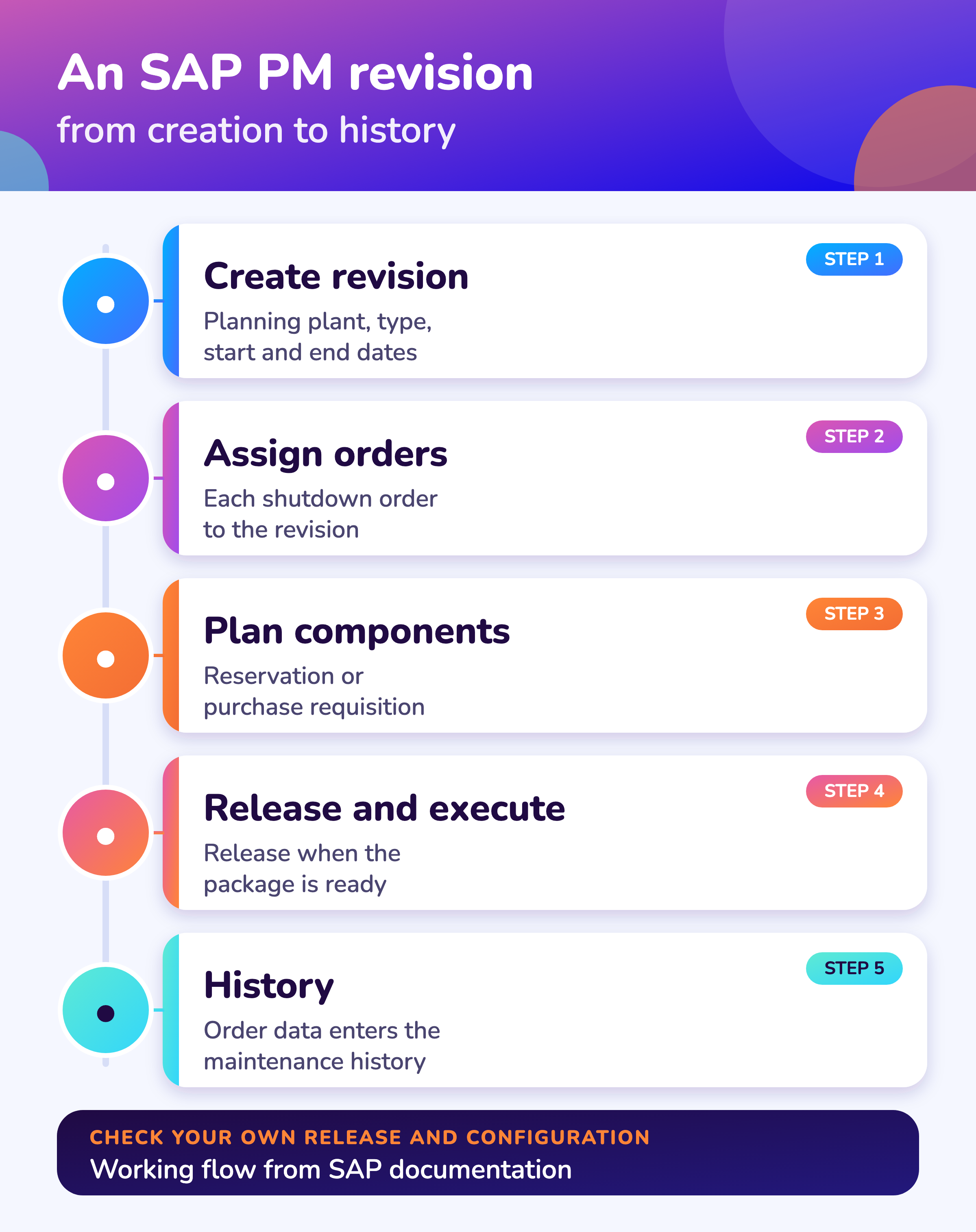
An SAP PM revision is an object that represents a planned maintenance period, such as a shutdown: it is created for a planning plant with a revision type, a description and start and end dates, and maintenance orders can be assigned to it. 2,1
SAP Help describes creating a revision in the Maintenance Event Builder by choosing a planning plant and a revision type, then entering a description and the revision start and end dates, a technical object, and optionally a WBS element or a network. 2 The Maintenance Order page lists the revision among the objects an order can be assigned to, beside profit center, project and investment program position. 1
In practice planners use the revision as the label for all work that belongs to a stop, so they can list and report on it. That use is common practice rather than a statement in the SAP pages we read.
Software
Where does MaintWiz fit when SAP PM is your system of record?
MaintWiz adds the shutdown plan on top of SAP PM, with critical path, float, readiness gates, permits and an executive view, and leaves orders, materials, costs and history in SAP.
About MaintWiz. MaintWiz is an industrial AI platform with IoT, SAP integration and predictive maintenance (PdM) capabilities. Its shutdown and turnaround module helps plants plan, schedule, execute and close out shutdown work.
Also see the shutdown module FAQ and free templates.
What the shutdown module covers
As described on the MaintWiz shutdown maintenance product page.
- SAP integration through the PM or the MM module, one mode per customer; SAP stays the system of record
- Gantt chart with critical path and float, baselines and a float flag
- Seven readiness gates with signed waivers
- Needed, in stock and short parts, with the SAP status of each short part: none, purchase request raised or purchase order issued
- Permits and isolations from ePTW on each work order
- Import and export with Excel, Primavera P6 and Microsoft Project
Proof
What MaintWiz customers report
Figures as published in MaintWiz case studies on maintwiz.com. They come from maintenance management projects, not shutdowns.
What it adds
What does a shutdown tool add on top of SAP PM?
A shutdown tool adds the plan on top of the orders: a logic-linked schedule with critical path and float, readiness gates, shared-trade views, permits tied to each work order and an executive view, while SAP PM stays the system of record for orders, materials, costs and history. 8,7
| Need | SAP PM | Shutdown plan (MaintWiz shutdown module) |
|---|---|---|
| Logic-linked schedule with critical path and float | Orders carry dates and a revision groups them; the documentation read does not describe float across orders | Gantt chart with critical path and float, a flag at a float limit you set, baselines that show what moved |
| Readiness before a package starts | Release status of the order and component availability | Seven readiness gates with signed waivers: materials, resources, predecessors, tools and scaffold, permits and isolations, scope and engineering, go |
| Shared trades across projects | Work centers and capacity by plant | Availability of trades and common tools across up to 20 concurrent projects |
| Permits and isolations tied to work | Depends on your PM configuration | ePTW permits and isolations on each work order; a package with an open permit cannot be closed |
| Executive view | Reports on orders and costs | Health matrix, decisions ranked by effect in days and money, one timeline across projects |
| System of record | Yes: orders, materials, costs and history stay in SAP | SAP stays the system of record; the plan reads and shows it |
The left column is our reading of the SAP pages cited; the right column describes the MaintWiz shutdown module as built. See the shutdown management software page and the MaintWiz shutdown module data sheet.
Data exchange
What data moves between SAP PM and a shutdown plan?
Between SAP PM and a shutdown plan the main data are the orders and their operations, the revision and its dates, notifications for findings, the technical objects, the components with their reservations and requisitions, and the status and cost, and each needs a stated owner, direction and frequency.
| Object | Directions to consider | Question to settle in implementation |
|---|---|---|
| Maintenance orders and operations | SAP to plan | Which orders belong to the stop: by revision, by order type, by selection? |
| Revision and its dates | SAP to plan | Does the revision window set the plan window, or the other way round? |
| Order and operation dates | SAP to plan, plan to SAP, or both | Where is a date changed, and who approves it? |
| Notifications for findings | Plan to SAP, or SAP to plan | How does a finding become an order, and who approves added work? |
| Equipment and functional locations | SAP to plan | Which technical objects are in scope? |
| Components, reservations and requisitions | SAP to plan | See the materials page: status of each short part |
| Order status and costs | SAP to plan | Which statuses close a package; does cost stay in SAP only? |
MaintWiz connects to SAP through the PM or the MM module, not both, and SAP stays the system of record. The objects, direction and frequency are agreed per customer during implementation. A worksheet for this is in the free shutdown templates. For the materials side see SAP MM shutdown materials.
System of record
How do you keep SAP the system of record during a shutdown?
Keep SAP the system of record by giving every field one owner, changing each date in one place, starting new work as a request that becomes an SAP order, reconciling counts daily and closing orders in SAP only when the plan shows the package closed.
If you move to S/4HANA, see SAP S4HANA maintenance data migration.
| Rule | Why |
|---|---|
| Every field has one owner: SAP or the plan | Two owners create two versions of a date |
| Change dates in one place and send them across | Avoids silent overwrites |
| New work found in the stop starts as a notification or request, then becomes an order in SAP | Keeps scope traceable |
| Reconcile counts of orders, hours and cost daily | Catches missed exchanges early |
| Close orders in SAP only when the plan shows the package closed | Keeps history and cost consistent |
These are working rules, not SAP guidance.
Preparation
How do you prepare SAP PM for a shutdown?
Prepare SAP PM by creating the revision, assigning the shutdown orders to it, setting the requisition indicator for long-lead parts, planning components on operations, releasing orders only when their packages are ready and capturing findings as notifications. 2,1,3,4,5
A free Excel version is available: SAP PM shutdown preparation and data exchange (.xlsx).
| Step | Basis |
|---|---|
| Create the revision for the stop with its planning plant, type, dates and technical object | SAP Help, Creating Revisions in the Maintenance Event Builder |
| Assign the shutdown orders to the revision | SAP Library, Maintenance Order |
| Set the reservation and requisition indicator so long-lead items are requisitioned when the order is created | SAP Documentation, Materials Planning and Requirements Planning |
| Plan components on operations: material cannot be planned for sub-operations | SAP Documentation, Materials Planning |
| Release an order only when its package is ready: stock withdrawal needs a released order | SAP Documentation, Use of Stock and Non-Stock Material |
| Capture findings as notifications; approve added work in writing | Working practice |
Download the SAP PM preparation and data exchange worksheet to track these steps. See also the 40-step checklist and scope management.
Modes
Does MaintWiz connect through SAP PM or SAP MM?
MaintWiz connects to SAP through the PM module or through the MM module, one per customer, not both, with SAP staying the system of record; PM mode centers on the maintenance orders and MM mode on reservations, requisitions and purchase orders.
| PM mode | MM mode | |
|---|---|---|
| SAP supplies | Maintenance orders and operations, the revision, notifications and technical objects | Reservations, purchase requisitions, purchase orders and stock |
| The shutdown plan adds | Schedule with critical path and float, readiness, permits, executive view | Material readiness per job: needed, in stock, short and the SAP status of each short part |
| Typical fit | PM drives planning and the orders already exist there | The materials team owns supply and the plan needs status |
| Read next | This page | SAP MM shutdown materials |
Which objects each mode reads, and whether the exchange is read-only, is settled per customer in implementation.
Visuals
Save the SAP PM shutdown charts
Two charts to share with your SAP and planning teams. Click either for the full-size image.
FAQ
Frequently asked questions
Can SAP PM manage a turnaround?
SAP PM holds the orders, components, revision and history of a turnaround. Networks with float and a critical path across orders come from SAP Project System or from a shutdown plan on top of PM. 1,2
What is an SAP PM revision?
An object for a planned maintenance period, created with a planning plant, a revision type, a description and start and end dates; orders can be assigned to it. 2,1
How do you tag shutdown orders in SAP PM?
Assign each order to the revision for the stop. 1
What does a shutdown tool add on top of SAP PM?
A logic-linked schedule with critical path and float, readiness gates, shared-trade views, permits tied to work orders and an executive view.
What data moves between SAP PM and a shutdown plan?
Orders and operations, the revision and dates, notifications, technical objects, components and requisitions, and status and cost. Each needs an owner, a direction and a frequency.
Does MaintWiz connect to SAP PM or SAP MM?
To one of them, not both, and SAP stays the system of record.
How do reservations and requisitions get created?
The system generates them from order components: a reservation for stock material, a purchase requisition for non-stock. 3,6 See SAP MM shutdown materials.
Where does the maintenance history go after the stop?
Order data is entered in the maintenance history. 1 If you are moving to S/4HANA see keeping maintenance history.
Sources
Sources
- SAP Library, Maintenance Order (Plant Maintenance, PM)
- SAP Help, Creating Revisions in the Maintenance Event Builder (SAP ERP; read from the search summary of the page, the page itself did not load by script)
- SAP Documentation, Materials Planning (Plant Maintenance)
- SAP Documentation, Requirements Planning (Plant Maintenance)
- SAP Documentation, Use of Stock and Non-Stock Material (Plant Maintenance)
- SAP Library, Materials Planning (Customer Service and Plant Maintenance; older release, no release stated)
- US Government Accountability Office, GAO Schedule Assessment Guide: Best Practices for Project Schedules (GAO-16-89G, December 2015)
- US Department of Health and Human Services, Earned Value Management, Appendix D: Glossary of Terms
Plan on top of SAP, keep SAP as the record
Book a demo and bring your SAP setup. We will walk through how MaintWiz can work with it.