
Shutdown module
Shutdown Management Software for Plants and Turnarounds
MaintWiz shutdown management software plans, schedules, controls and closes out a plant shutdown in one place: a Gantt chart with critical path and float, readiness gates, work orders with checklists, spares with SAP status, permits from ePTW and an executive view of every project.
The shutdown module is an add-on to the MaintWiz platform.
By Jai Balachandran · Published · Last reviewed
Works with:SAPExcelPrimavera P6MS ProjectePTWIoT
The module
What does MaintWiz shutdown management software do?
MaintWiz shutdown management software plans, schedules, controls and closes out a plant shutdown in one place: a Gantt chart with critical path and float, readiness gates, work orders with checklists, spares with SAP status, permits and isolations from ePTW, and an executive view of every project. 1
To compare the module with a CMMS and with scheduling software, see shutdown software vs CMMS vs Primavera P6. A PDF data sheet lists the specifications.
It is built for planned shutdown maintenance, including turnarounds and planned outages. The three words are not synonyms: see shutdown, turnaround and outage compared.
| Shutdown task | What MaintWiz does | Where it lives |
|---|---|---|
| Plan the portfolio | Shows current projects on a board by phase or on a timeline, up to 20 at once, with blackout windows from the admin calendar and the availability of trades and common tools | Portfolio |
| Build the schedule | Gantt chart and table with critical activities and float, a flag when float falls to your limit, baselines that show what moved, and scaffolding as a work order of the package that needs it | Plan, Schedule |
| Check readiness | Seven gates for every work package: materials, resources, predecessors, tools and scaffold, permits and isolations, scope and engineering, and a go result. Waivers and sign-offs need a typed reason and are saved with the name and the date | Controls, Readiness |
| Control cost and risk | Earned value (planned, earned, actual) with cost and schedule indices, budget against actual and forecast, and a risk register with a score and an owner | Controls |
| Manage spares | Needed, in stock, short and SAP cover for each part, with the SAP status of none, purchase request raised or purchase order issued | Supply chain |
| Run the work | Work orders with five states, a task list for each type of activity, tick, reading and photo tasks, limits on readings, hours and parts used, findings sent to the planner, handover notes and attachments | Execute |
| Control permits and isolations | Permits and isolations from ePTW show on each work order and feed the readiness gate. A package with an open permit or isolation cannot be closed | Execute and Controls |
| Close packages and the project | Completion from closed tasks, status that rolls up from work orders to packages to the project, closure below 100 % only with a typed reason, and reopening | Execute, Work packages |
| Close out | Handover, lessons learnt, reports, deferred items and an archive of closed projects | Close-out |
| See it as an executive | A health matrix with the worst project first, decisions ranked by effect with Approve and Decline, the effect in days and in money, and one timeline of all projects | Exec View |
| Set the rules | Calendars, shifts, rate cards, tool hire rates, units, planning rules and menu access by role | Admin |
The module is an add-on to the MaintWiz platform and reuses its work orders, spares, approvals, ePTW, preventive maintenance scheduling, instruments and calibration, and SAP integration.
Executives
Decide with the executive view
Executives see which project is at risk first, what each issue costs in days and in money, and can approve or decline the decisions waiting for them in the same view.
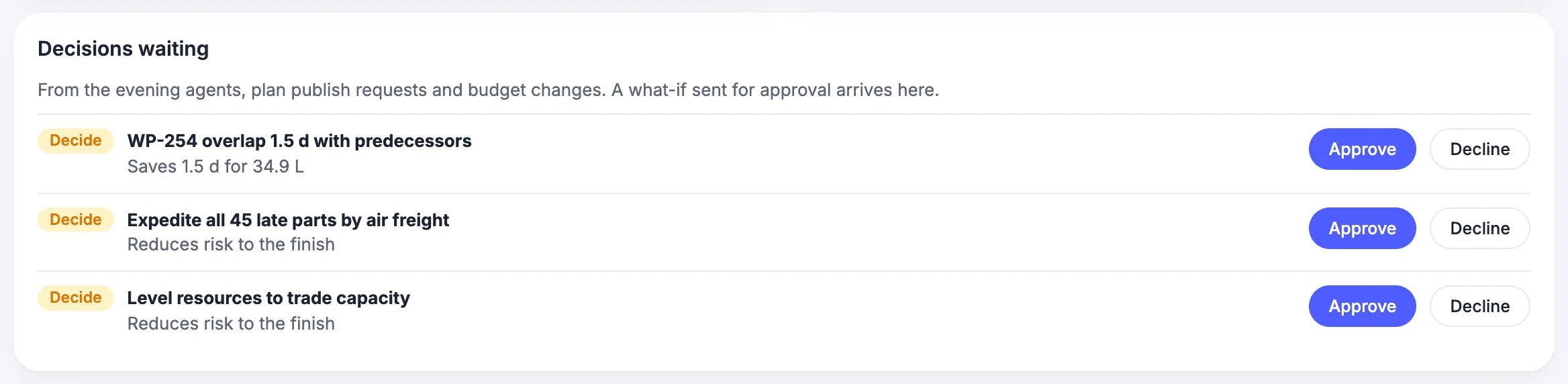
For a worked planned-versus-actual review, see this shutdown case study.
The health matrix reads each cell against tolerances that an administrator sets, and the decision cards are ranked with the largest effect first. One timeline shows every project, with proposed projects as dashed bars.
Follow-through
Track actions to closure
Every action has an owner and a due date, and the view groups them by person and by date so overdue work is visible at once.
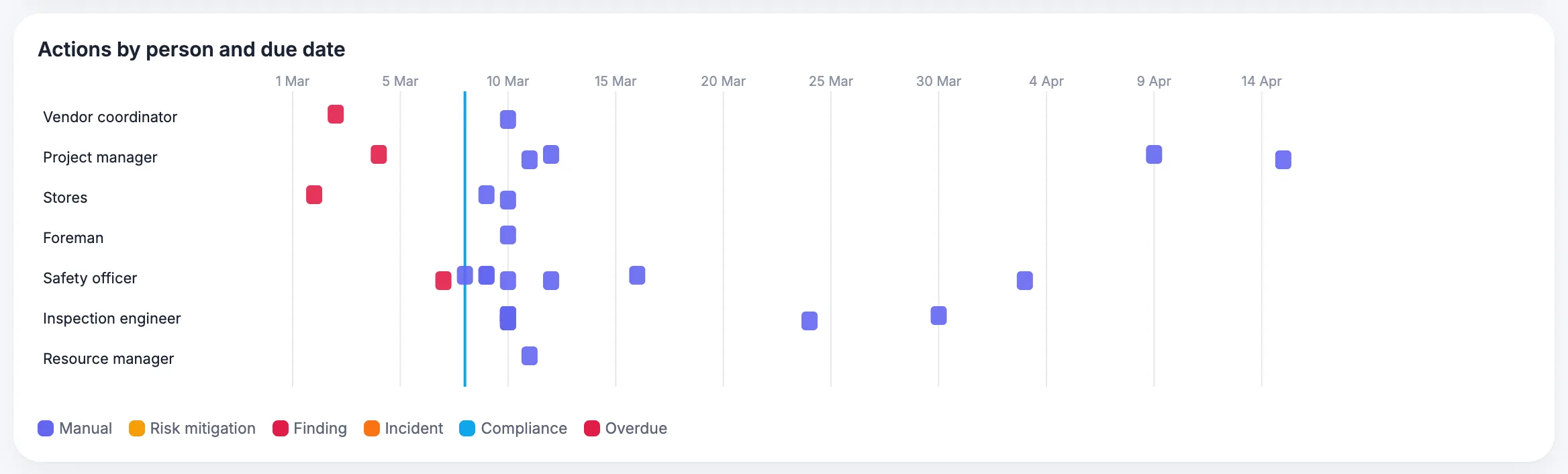
Findings that technicians raise in the field reach the planner as requests for added work, so nothing found during the stop depends on someone remembering to report it.
Portfolio
Plan shared trades across projects
The portfolio shows how many people of each trade and how many of each common tool are in the pool, how many are in use, and how many are available each week, so shared resources are not promised twice.
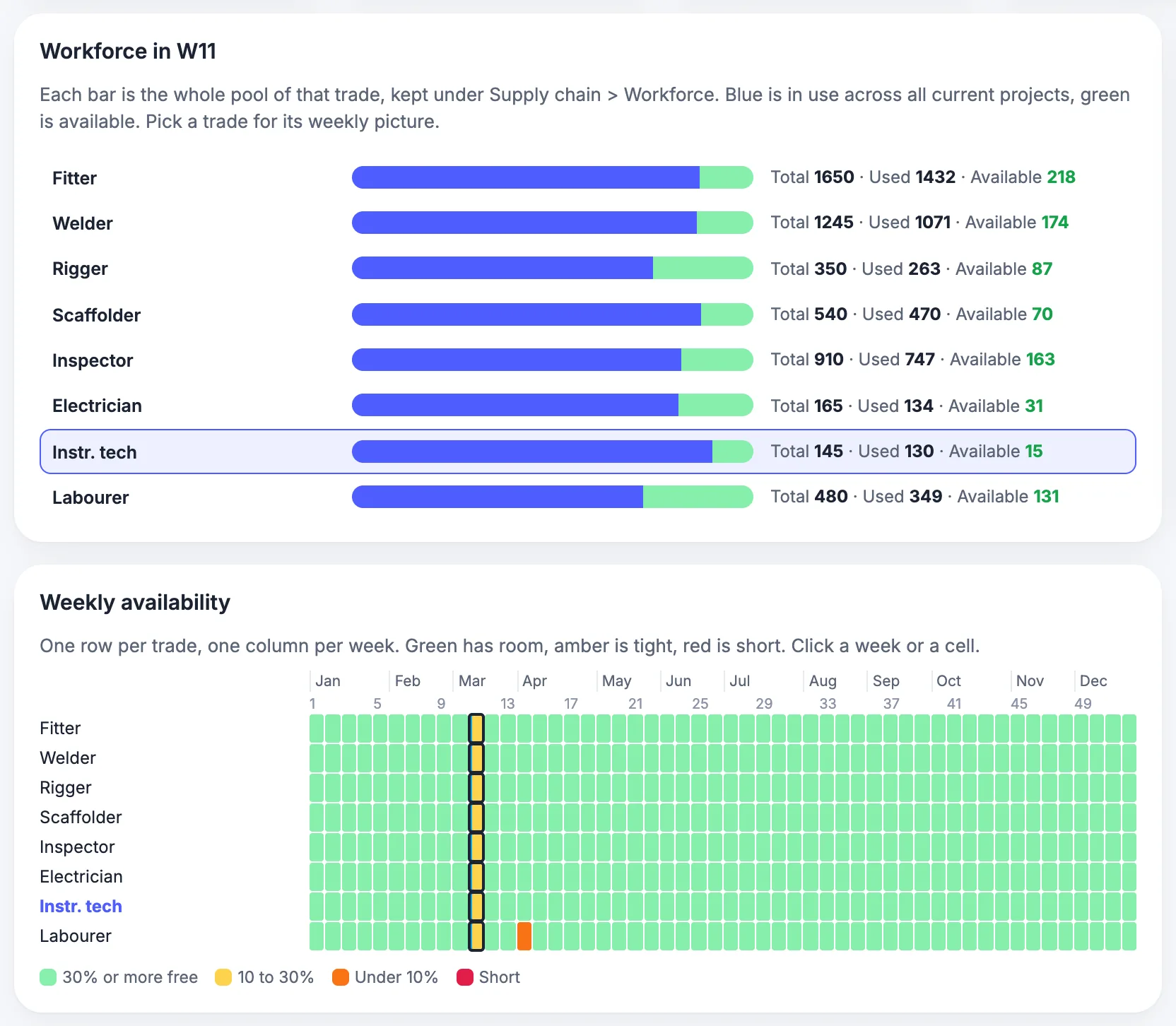
It is designed for up to 20 projects running at the same time in one portfolio. The calendar of the facility sets the default shifts and holidays, and a single project can override them.
Slotting
Compare slotting scenarios
Compare where upcoming projects could start against the resource pool, material lead times and blackout windows, and see the conflicts each option creates before you commit to dates.
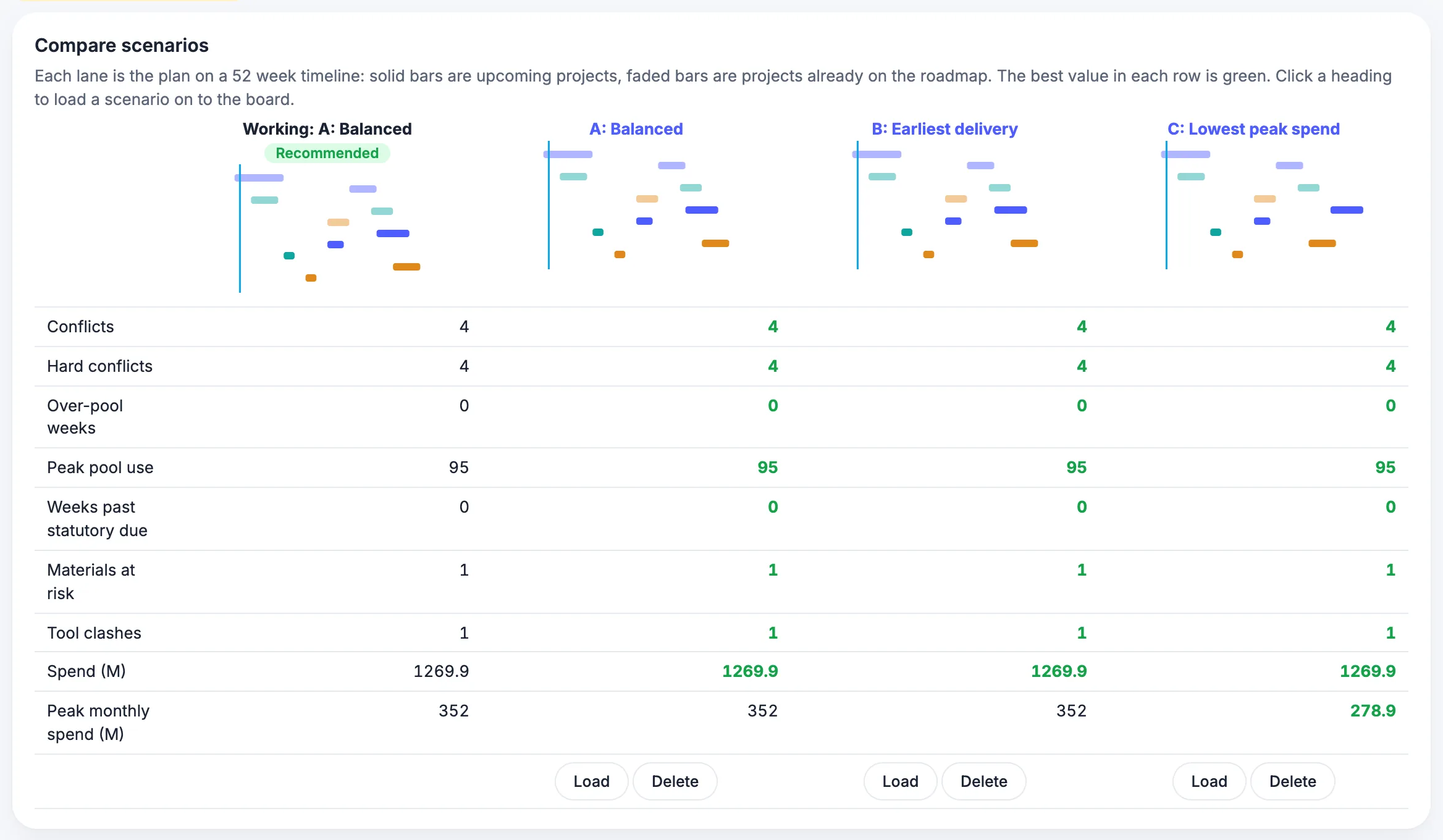
Each scenario shows the conflicts, the weeks over the pool and the spend, so the choice rests on numbers rather than on a meeting.
Connections
What does MaintWiz shutdown software connect to?
MaintWiz connects to SAP through the PM or MM module, to Excel, to Primavera P6 and Microsoft Project, to IoT sources and to ePTW, so a shutdown plan does not live in a separate silo.
To compare with a CMMS and Primavera P6, see shutdown software vs CMMS vs Primavera P6. SAP integration is explained in SAP PM shutdown management and SAP MM shutdown materials.
| System | What the connection does | Status |
|---|---|---|
| SAP | Keeps SAP as the system of record. MaintWiz connects through the SAP PM module or the SAP MM module, and shows the status of purchase requests and orders against each part | Available |
| Excel | Imports resources and work from Excel templates, and exports the tables behind the charts | Available |
| Primavera P6 and Microsoft Project | Imports and exports schedules so planners can keep working in their scheduling tool | Available |
| IoT | Brings sensor data from plant equipment into MaintWiz | Available |
| ePTW | Permits and isolations are created in ePTW and appear on the work order and in the readiness gate | Available |
| Work orders, spares, approvals, preventive maintenance scheduling, instruments and calibration | Shared with the rest of the MaintWiz platform, so shutdown work uses the same records as daily maintenance | Available |
If SAP is your system of record it stays that way. The spare parts guide explains how purchase request and order status feed material readiness.
Limits
What does the module not do today?
The module does not track the delivery of spares, adds no approval or root cause step of its own to a work order, and works offline only on transaction screens.
Common questions about scope and limits are answered in the shutdown module FAQ.
| Topic | Today |
|---|---|
| Delivery of spares | It shows total, used, available and forecast quantities and the SAP request or order status. It does not track shipment or arrival dates |
| Approval and root cause on a work order | The shutdown work order does not add an approval step, root cause analysis or corrective action workflow of its own |
| Offline use | Transaction screens work offline. Planning and portfolio screens need a connection |
| Predictions and AI agents | Not available yet. See what is planned below |
| Digital twin | Not part of the module |
Roadmap
What is planned next?
Monte Carlo finish confidence, critical chain analysis, what-if scenarios, forecast drill-downs, daily actual cost and AI actions with an approval step are planned for later releases and are not available today.
For what to digitize first and what is planned, see digital shutdown management. SAP history: SAP S4HANA maintenance data migration. AI agents for shutdown planning are covered in AI shutdown planning.
| Capability | What it will do |
|---|---|
| Monte Carlo confidence of the finish date | Runs the schedule many times with uncertain durations and shows how likely each finish date is |
| Critical chain analysis | Analyses the schedule with resource constraints and buffers |
| What-if scenarios | Tests the effect of changed durations, crews or materials on the finish before you decide |
| What moves the forecast finish | Shows each cause of a change in the forecast finish, with a drill-down to the packages behind it |
| Forecast methods with formulas and inputs | Shows each forecast method with its formula and inputs |
| Daily actual cost | Stores the actual cost of each day for a true cost history |
| AI actions with approval | Proposes changes from live project numbers and asks a person to approve each before anything is written |
Dates for these releases are not published on this page.
In the field
How do technicians and planners work on phones and tablets?
Technicians open a work order on a phone or tablet, scan the equipment QR code, tick tasks, enter readings against their limits and attach photos; transaction screens keep working offline.
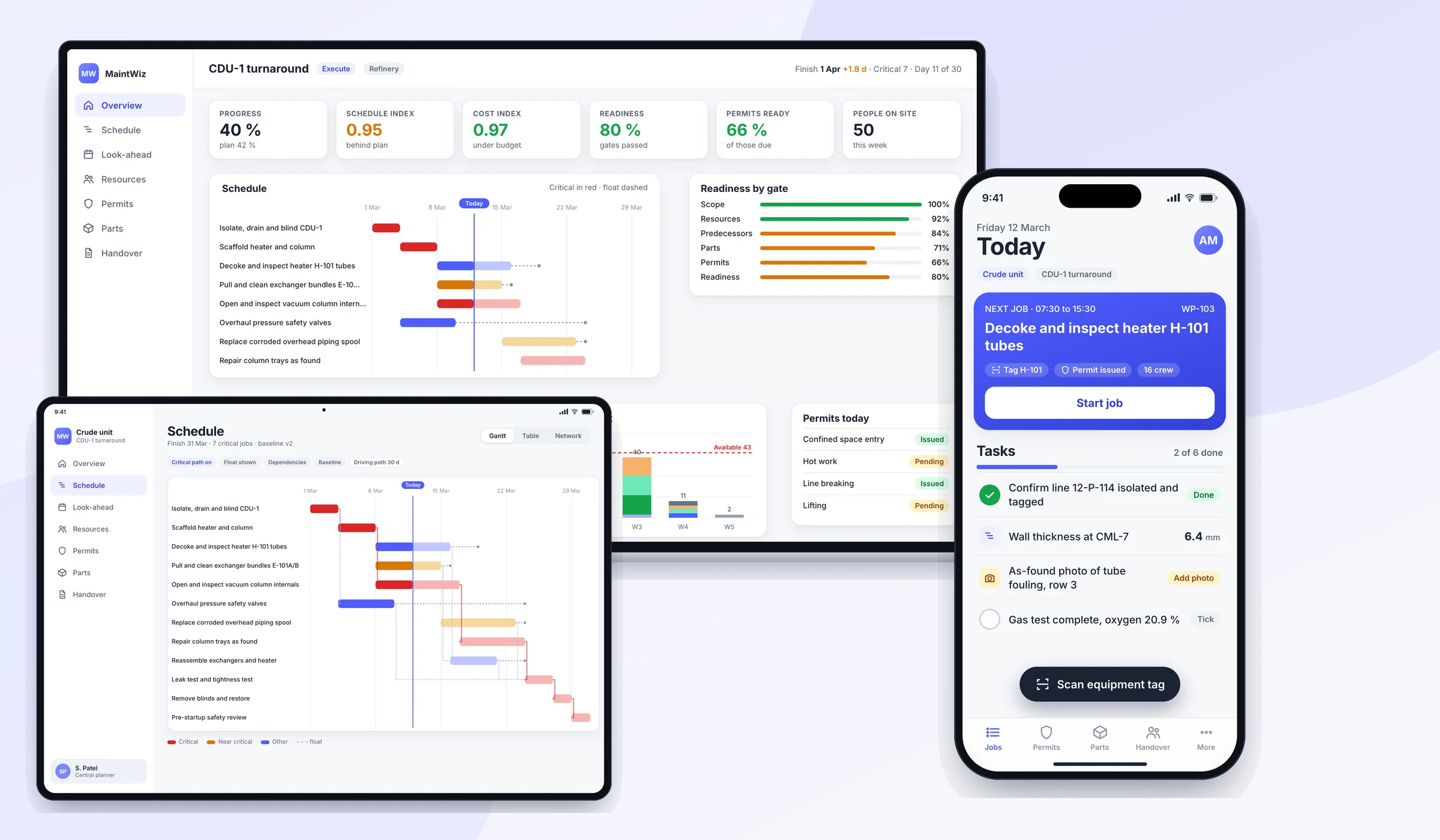
Planners and project managers use larger screens for the schedule and the portfolio. Foremen by default see only My Day and the work orders of Execute, and an administrator can change what each role sees.
Definitions
Where do the terms on this page come from?
The scheduling, cost, isolation and SAP terms used on this page are defined by public sources: the HHS earned value glossary, the GAO schedule guide, OSHA, HSE and the SAP library. 2,1,3,4,5
| Term | Public definition or rule | Source |
|---|---|---|
| Critical path | The path through a network of dependent tasks with the longest elapsed time; any delay to a task on it delays the finish by the same amount | HHS earned value glossary, GAO schedule guide |
| Float | The time an activity can slip without delaying a later date; float is not contingency | GAO schedule guide |
| Earned value, CPI and SPI | Earned value is completed work valued at its budget; CPI is earned value divided by actual cost and SPI is earned value divided by planned value | HHS earned value glossary |
| Lockout and isolation | Lockout places a lock on an energy isolating device so the equipment cannot be operated; OSHA 1910.147 sets the six steps and HSE HSG253 sets three isolation categories | OSHA 1910.147, HSE HSG253 |
| Reservation and purchase requisition | In SAP Plant Maintenance the system generates both from order components; neither can be created individually | SAP Library |
Definitions are paraphrased; read the source for the exact wording. Module descriptions on this page come from the MaintWiz product requirements, not from these sources.
Visuals
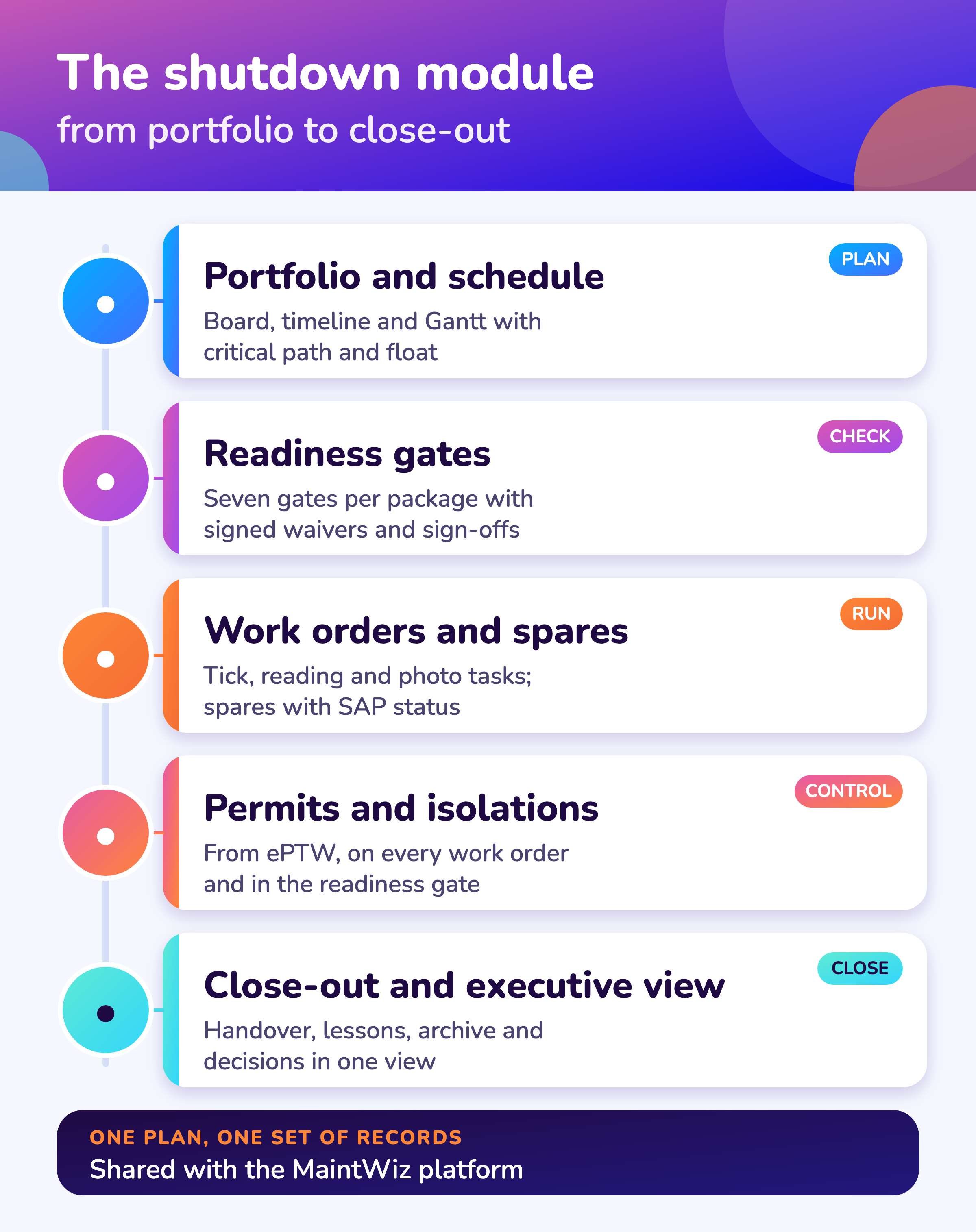
Save the module overview
One chart to share with your team. Click it for the full-size image.
FAQ
Frequently asked questions
What is MaintWiz shutdown management software?
An add-on module of the MaintWiz platform that plans, schedules, controls and closes out plant shutdowns, turnarounds and outages, from the portfolio down to the task a technician ticks.
Is shutdown software the same as a CMMS?
No. A CMMS manages routine work orders, assets and spares. Shutdown software adds a time-boxed plan with a critical path, readiness gates and a view across projects. The MaintWiz shutdown module reuses the platform records, so both work from the same data. See the terms compared.
Does MaintWiz replace SAP PM or Primavera P6?
No. SAP remains the system of record and MaintWiz connects through the SAP PM or the SAP MM module. Schedules can be imported from and exported to Primavera P6 and Microsoft Project.
Can I import my shutdown plan from Excel?
Yes. Resources and work can be loaded from Excel templates, and the tables behind the charts export to Excel.
How are permits and isolations handled?
They come from ePTW. They show on each work order and in the readiness gate, and a work package with an open permit or isolation cannot be closed.
Does it work offline?
Transaction screens such as work orders work offline. Planning and portfolio screens need a connection.
Does it use AI to predict delays?
Not yet. Monte Carlo finish confidence, what-if scenarios and AI actions with approval are planned for later releases.
How many projects can it handle?
It is designed for up to 20 projects running at the same time in one portfolio, shown on a board or a timeline.
Who uses it?
Central planners and project managers plan and control, foremen and technicians run the work orders, executives use the executive view and administrators set calendars, rates and access by role.
Where is the checklist for a shutdown?
See the 40-step shutdown checklist.
Sources
Sources
The module description on this page comes from the MaintWiz product requirements and the current product build. The one external source defines the scheduling terms used here.
- US Government Accountability Office, GAO Schedule Assessment Guide: Best Practices for Project Schedules (GAO-16-89G, December 2015)
- US Department of Health and Human Services, Earned Value Management, Appendix D: Glossary of Terms
- OSHA, 29 CFR 1910.147, The control of hazardous energy (lockout/tagout)
- UK Health and Safety Executive, The safe isolation of plant and equipment (HSG253, 2006)
- SAP Library, Materials Planning (Customer Service and Plant Maintenance; older release, no release stated)
See your shutdown in one plan
Book a demo and bring your shutdown scope. We will walk through how MaintWiz can support it.